

Important Notice:To ensure compliance with the EU user consent policy and continue accessing Customer Match within the European Economic Area (EEA), Google is enhancing its enforcement measures. Google requires its partners to update to the latest
Google Ads API v15 and begin transmitting consent signals for users in the EEA region. The following are the consent signals it covers:ad_user_data: Indicates consent to send user data for advertising purposes to Google.ad_personalization: Indicates consent for ad personalisation.
- Provide Zeotap CDP with the appropriate consent parameters covering the two consent signals requested by Google(
ad_user_dataandad_personalization) - Establish relevant Consent Orchestration rules to ensure that only users who have consented to perform ad personalisation on Google Products are ingested.
Overview
Google Customer Match is a powerful advertising feature that allows marketers to target their own customer data in Google Ads campaigns. Integrated with Zeotap, it allows marketers to use the online and offline data to reach and re-engage with their customers across Search, the Shopping tab, Gmail, YouTube and Display. You can use Google Ads or DV 360 depending on your role and your requirement.Use cases
To clarify when and how to use the Google Customer Match destination, consider the following use cases that organisations can address using this integration.Use Case #1
A home appliance retailer aims to connect with its existing customers on Google Search and YouTube. By analysing purchase histories and preferences, the retailer can personalise promotions for specific product upgrades or accessories. They can upload email addresses from their CRM to the Zeotap CDP platform, build tailored audience segments, and send them to Google Customer Match. This enables precise targeting for their ad campaigns, enhancing customer engagement while improving return on ad spend.Use Case #2
A travel agency wants to re-engage lapsed customers by showcasing tailored travel packages on Google Display Network and Gmail ads. By importing email data from their CRM into Zeotap CDP, the agency can build audience segments based on past travel preferences, such as destinations and seasons. These segments can be sent to Google Customer Match for use in targeted campaigns, encouraging customers to plan their next trip.Use Case #3
An e-commerce brand specialising in eco-friendly products seeks to promote its new product line to loyal customers on Google Shopping. The brand can upload their email database into Zeotap CDP, identify customers who purchased similar products in the past, and create a segmented audience. By sharing these segments with Google Customer Match, they can display tailored ads on Google Shopping, maximising visibility and driving sales for the new product line.Use Case #4
Businesses can suppress ads for existing customers or those who do not wish to be targeted. By creating suppression segments in Zeotap CDP and uploading them to Google Customer Match, brands can ensure these audiences are excluded from ad campaigns, optimising ad spend and respecting customer preferences.Use Case #5
Brands can target new prospects similar to high-value customers using lookalike audiences. By identifying high-value customer segments in Zeotap CDP and sending them to Google Customer Match, businesses can reach similar prospects and allocate higher budgets to these segments. Similarly, for low-LTV audiences, businesses can use lower cost limits to optimise spending and maximise ROI.Requirements for Using Google Customer Match
Customer Match is not available for all Advertisers. To use Customer Match, the account must have the following details:- A good history of policy compliance
- A good payment history
- At least 90 days history in Google Ads
- More than 50,000 USD total lifetime spend. For advertisers whose accounts are managed in currencies other than USD, your spend amount will be converted to USD using the average monthly conversion rate for that currency.
Target Audience
Customer Match is a useful advertising tool for many business goals, from increasing brand awareness to driving conversions. Here are a few examples of different audiences you can target with Customer Match:- On the Search Network and the Shopping tab, you can optimise your campaigns by adjusting your bid based on what you know about your customers’ activities.
- On Gmail, you can reach your customers or similar audiences using personalised ads at the top of their inbox tabs.
- On YouTube, you can reach new audiences, by targeting audiences similar to your most valuable customers.
- On Display, you can reach your customers or similar audiences using personalised ads on the Google Display Network.
Supported Identifiers
This integration supports hashed phone numbers in E164 format and hashed email addresses (mostly Gmail).Note:Follow these guidelines to ensure proper data handling and audience segmentation when using Customer Match:
- Ensure that the emails are hashed to
SHA256and cellphone numbers are converted toE164format before hashing it toSHA256. For more information about how to convert it toE164, refer to our hashing guidelines. - When you send multiple identifiers, such as email addresses, phone numbers, and MAIDs, to Customer Match, Zeotap CDP creates multiple audience segments within GCM (AdWords), each with a unique segment ID. The data is uploaded to the corresponding segments based on these IDs. The segment IDs are displayed separately on the UI. The segment name in AdWords for the identifiers appears in the following format:
{AudienceName}{DestinationName}_SegmentId
Available Actions and Supported Features
The following table lists the action types available for the integration and their supported features:Prerequisites
Ensure that you have below details available before creating a Google Customer Match Destination in Zeotap CDP.Seat ID
This is the unique ID assigned to your Advertiser account that you can locate next to your account name within the respective Google products. Note that you can add Seat ID for Google Ads and Google DV360 through this integration. Depending on the product that your Seat ID is associated with, you have to choose the corresponding Product Type.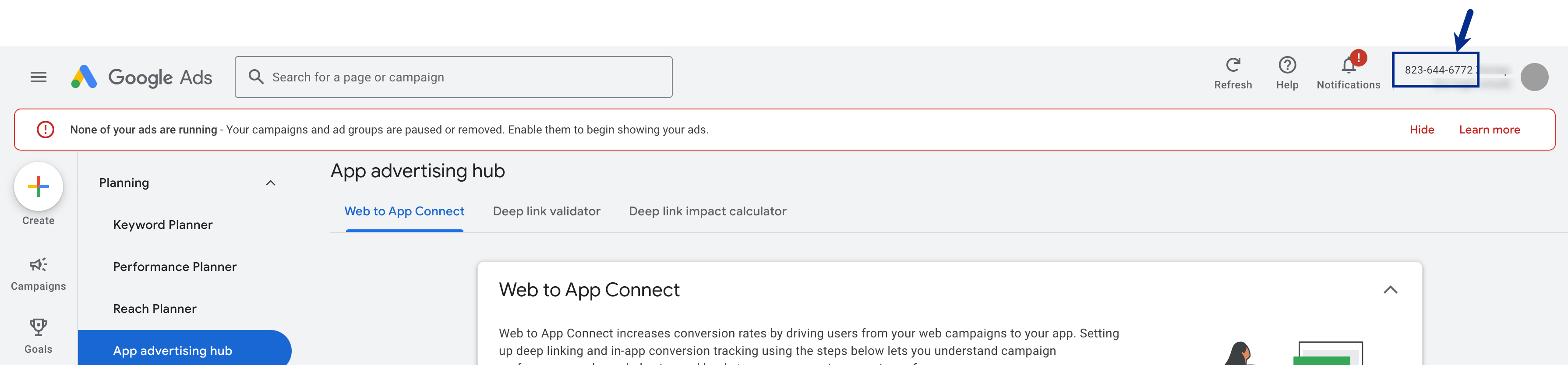
Supported Product Types
Based on the platform you want to use and your role, choose the Google product that matches your requirement. You can either use Google Ads (AdWords) or Google DV360 (Display & Video 360).- If you are using Google Ads, then choose ADWORDS as your Product Type. This allows you to serve ad campaigns on Search, the Shopping tab, Gmail, YouTube and Display.
-
If you are using Google DV360, a demand-side platform (DSP) for managing and optimising digital ad campaigns across channels like display, video, and connected TV, then choose from the below options.
- INVITE_PARTNER - Select this option if you are a Bid Manager Partner. A Partner manages multiple advertiser accounts under a single account, typically used by agencies or organisations handling campaigns for multiple clients.
-
INVITE_ADVERTISER - Select this option if you are an Bid Manager Advertiser. An Advertiser represents a single brand or organisation running its own campaigns in DV360
Key Differences Between a Partner and an Advertiser in DV360
Whitelist Zeotap on Google Products
To send audience (segments) from Zeotap CDP to Google Ads or DV360, you must first whitelist Zeotap on the platform you wish to use. Whitelisting is required for successful audience/segment creation; without it, the segments will fail. Follow the instructions below to whitelist Zeotap on either platform:- Whitelist Zeotap on Google Ads
- Whitelist Zeotap on Google DV360
Whitelist Zeotap on Google Ads
To send audience segments from Zeotap CDP to Google Ads, ensure that you whitelist Zeotap CDP by performing the following steps:1
Log into your Google Ads account.
2
In the left panel, navigate to Tools > Data Manager.
3
Under Data Manager, open the Connected products tab, click + Connect Product as shown below.
4
In the search box, search and select Zeotap and click Authorise.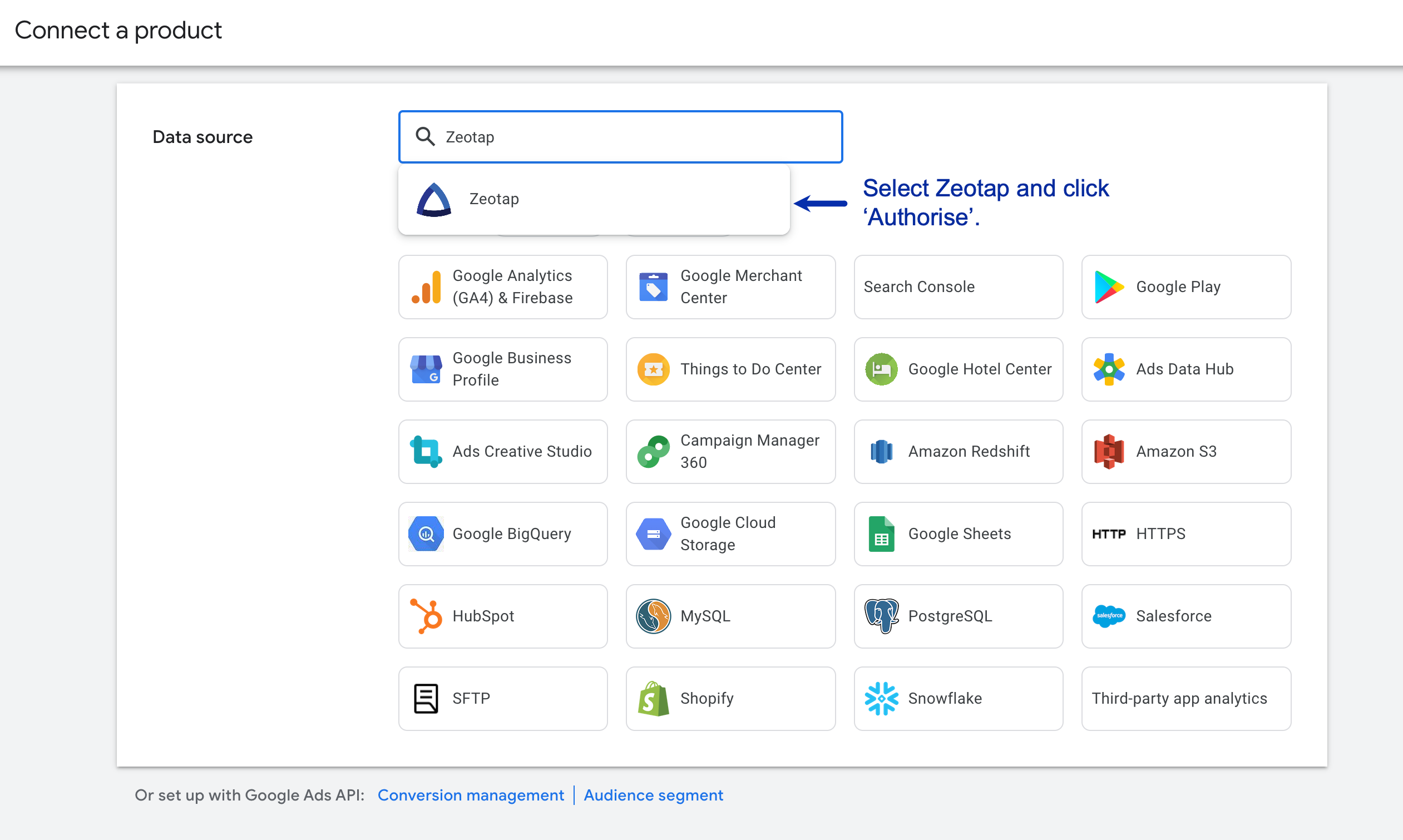
5
Once the data source is connected, you can use Zeotap CDP to create and send audiences to Google Ads as Customer Lists.
Whitelist Zeotap on Google DV360
A customer must perform a one-time initial mapping of your DV360 Advertiser or Partner ID to Zeotap before Zeotap can ingest any data into DV360. Also, ensure to provide the DV360 entity object (Partner or Advertiser) ID that you are associated with. This helps you know whether to push to the INVITE_PARTNER or INVITE_ADVERTISER products in the API service. Perform the following steps to link Zeotap to DV360 account:1
Log into your DV360 account with the appropriate credentials.
2
Navigate to Partner Settings and select Linked Accounts.
3
Under Linked Accounts, click LINK NEW ACCOUNT and select External Data partner.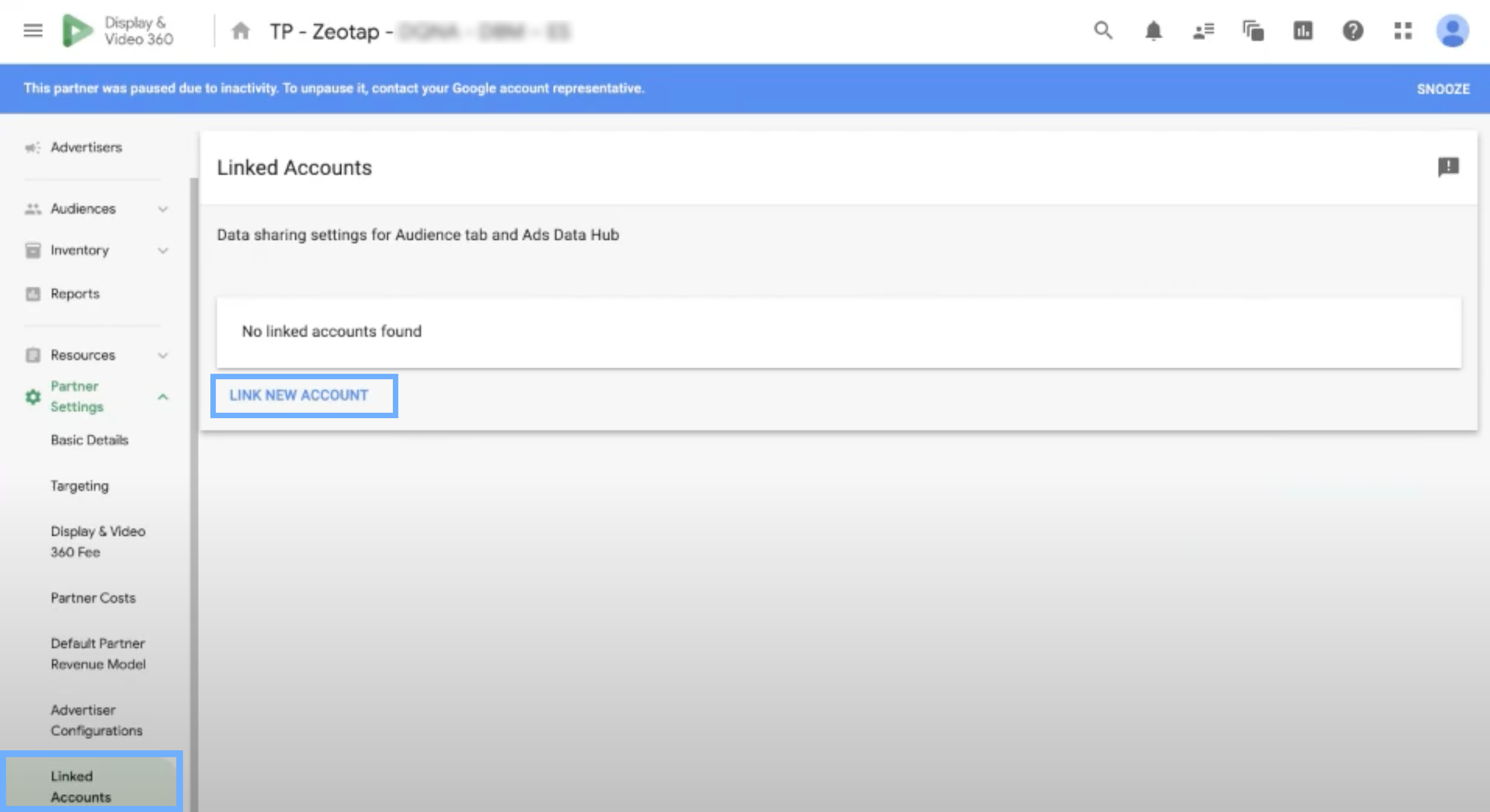
4
Under Account, search for Zeotap.
5
Select CMU: Zeotap (Customer Match Upload: Zeotap) as shown below and click Link.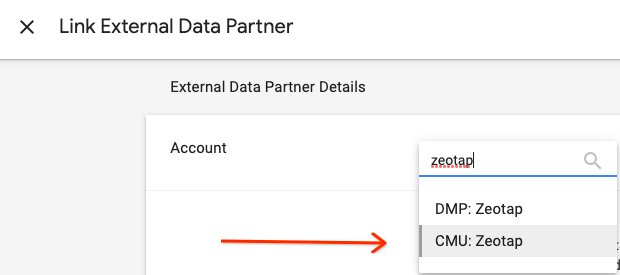
6
Once you complete the linking process, the Zeotap account appears under the linked accounts.
Create a Destination for GCM (Customer Contact Information)
Once you have completed the prerequisites mentioned above, perform the following steps to create a Destination for Google Customer Match (Customer Contact Information) in Zeotap CDP:1
Log into the Zeotap CDP App and go to the DESTINATIONS application.
2
Click + Create Destination.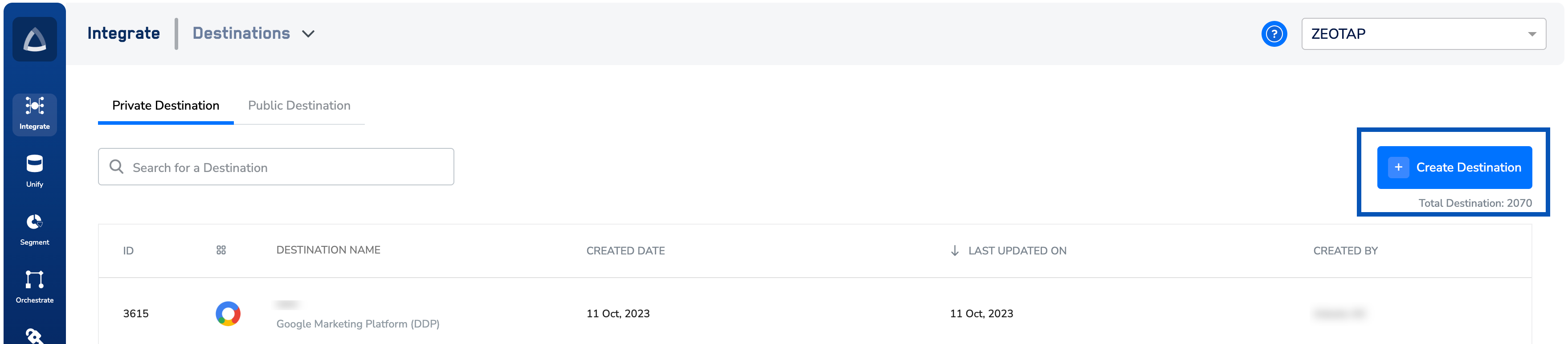
3
Under All Destinations, search for Google Customer Match (Customer Contact Information).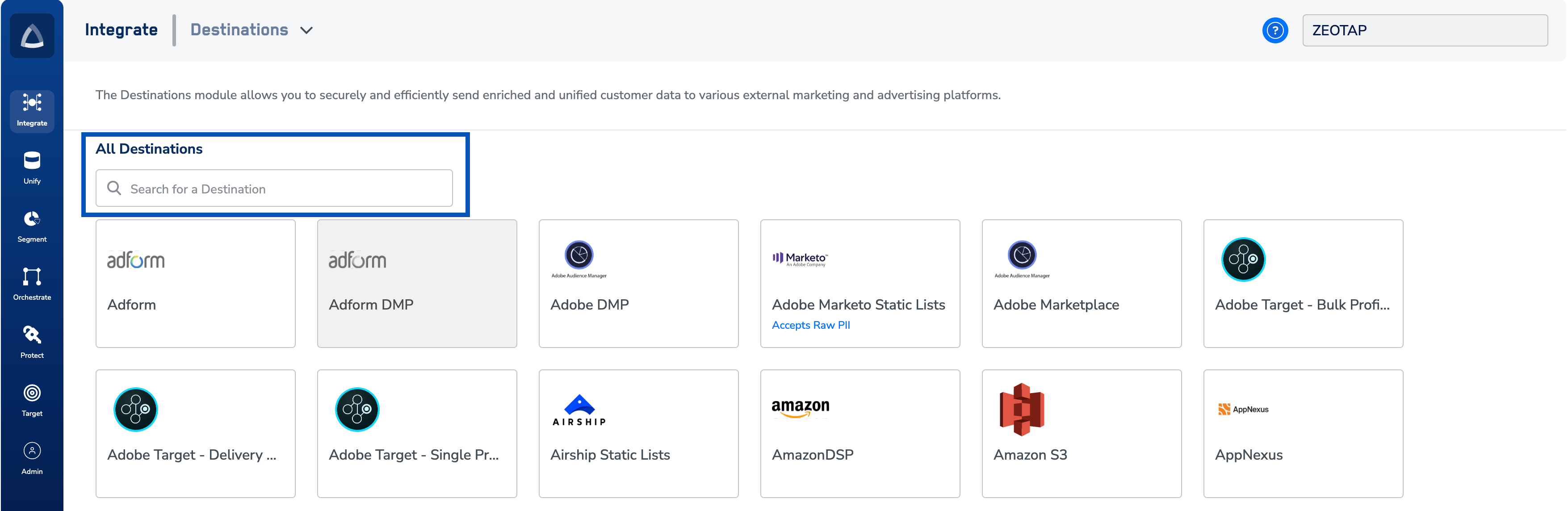
4
Click Google Customer Match (Customer Contact Information).
A screen appears displaying details about the particular destination towards the left. On the right-hand side of the screen find a list of fields that are required for the integration to be established. Enter the required details as mentioned in the following steps:a. Enter a name for the Destination.b. Enter the Seat ID numberof the accounton which you want the segment. Learn morec. Select the appropriate Product Type that the Seat ID belongs to. For more information about the Product Type, refer to the Components of Google Customer Match (Customer Contact Information). Learn mored. Click Next to proceed to mapping.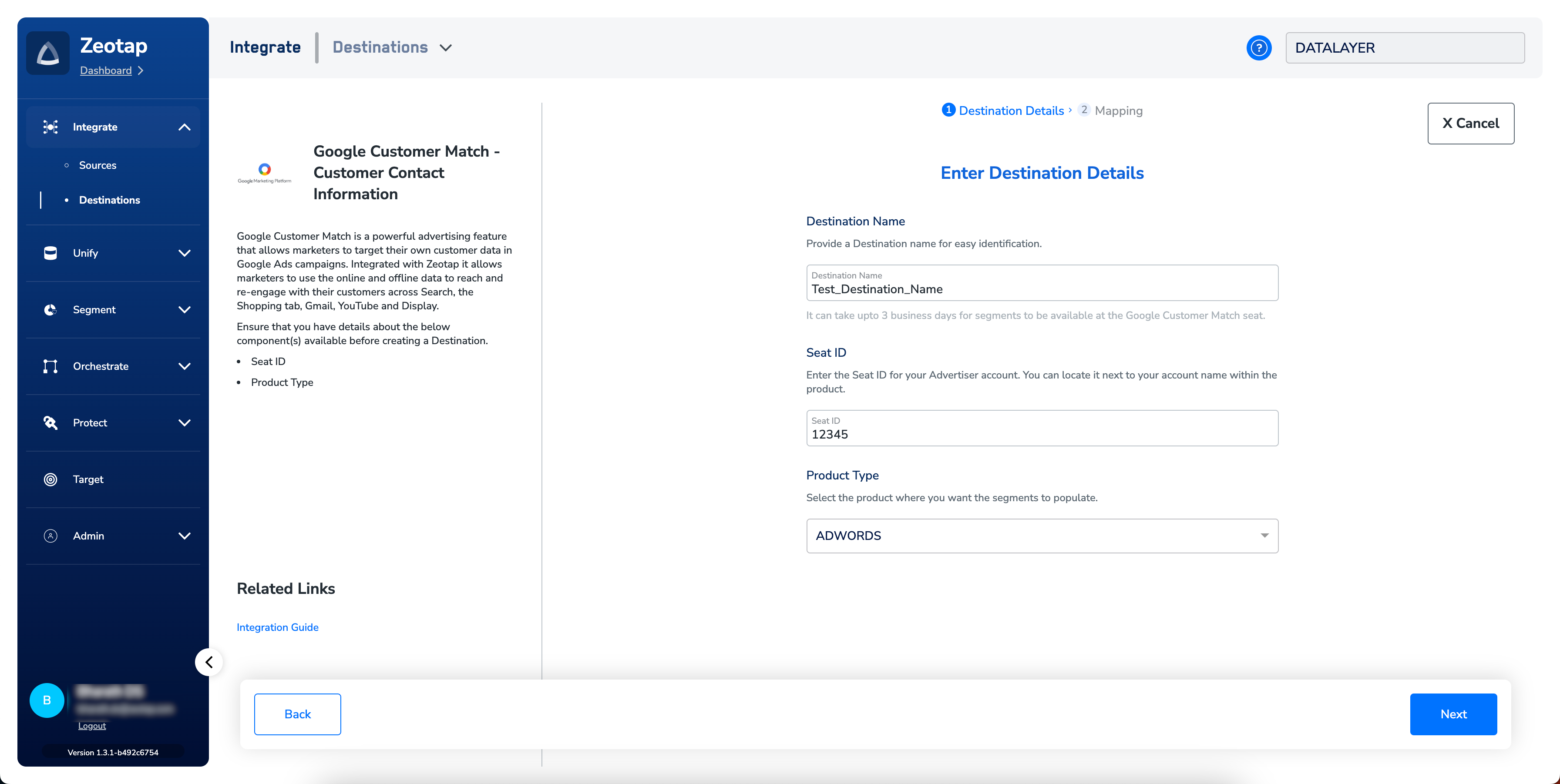
5
In the new screen that appears, choose the appropriate Action and mapping as explained below.a. Under Choose your Action, you can either choose Send Identifiers to Google Customer Match - Customer Contact Information or Send Multiple User Identifiersas the action based on your use case.i. If you choose Send Identifiers to Google Customer Match - Customer Contact Information, then the output identifiers 

email addresses and cellphone numbers are populated. Note that in this action, each identifier is sent as an individual user profile.Hashed email address, Hashed cellphone numbers, last name, first name, Country Code and Postal Code are populated. Note that in this action, all the identifiers selected under the mapping screen are sent as a single user profile.Note:To increase the match rate, we recommend that you use Send Multiple User Identifiers as the action.
6
Click Create Destination. The created Destination gets listed in the Audiencesapplication, which can be linked to an Audience/segment.
Link an Audience to the GCM (Customer Contact Information)
For information about how to link an Audience or segment to the created Destination in Audiences application, refer here. It can take up to three business days for segment to be available at the Google Customer Match (Customer Contact Information) seat. Note that the segments created on GCM appears in the format:{Audience Name}_{Audience Id}.
Note:The terms Audiences and Segments are used interchangeably to refer to customer cohorts belonging to a specific category. For example, an Audience or a segment can be a specific group of customers who are over 18 years of age and have performed an
addToCart event within the last 30 days.View Segments on Google Ads
Perform the following steps to view the segments pushed to Google Ads:1
Log into the client’s Google Ads account.
2
In the left panel, navigate to Tools.
3
Under Shared Library, select Audience manager.
4
Under Your data segments, you can view the list of all the segments pushed. You can find the ‘Customer list’ for any segment pushed through Google Ads along with the customer contact information tied to the particular segment under the Customer Type column. For Example, Customer list (Mobile Device IDs) or Customer list (Customer contact information).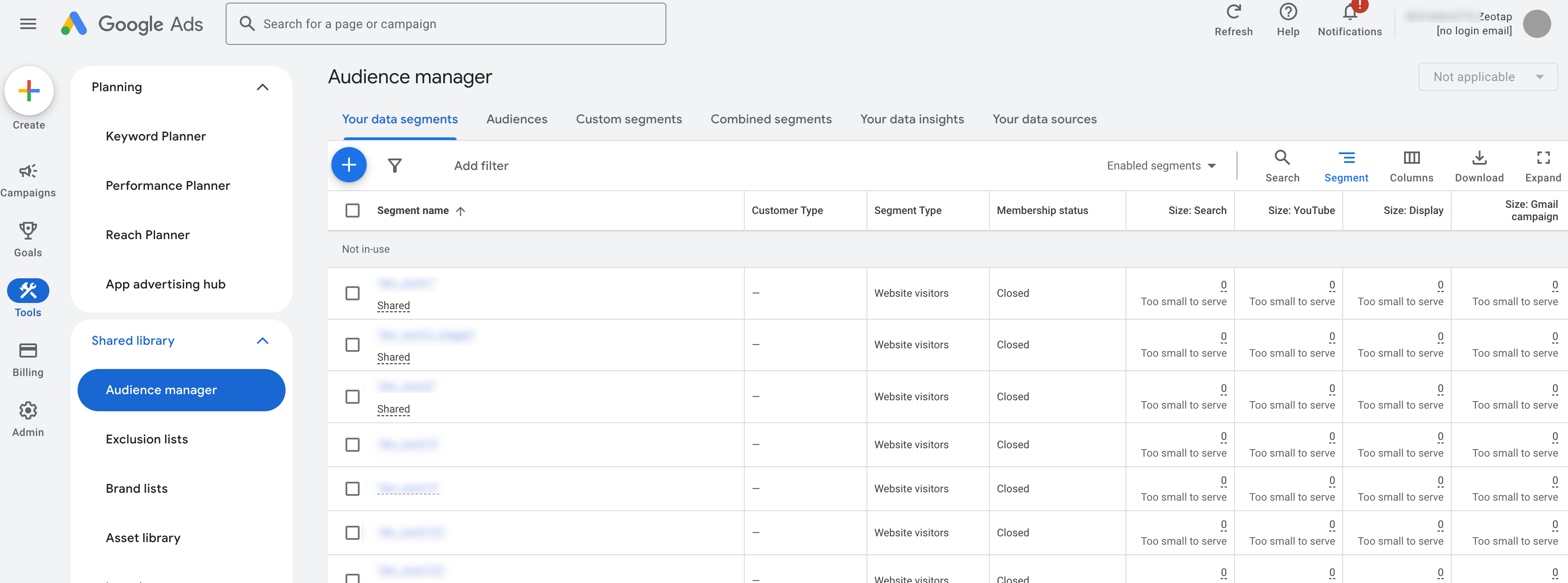
User Disqualification from Audiences
This integration supports user disqualification from audiences. That is, a user can be disqualified from an audience (segment) for various reasons, such as not meeting audience criteria, consent requirements or other conditions set for a particular audience.- When a user disqualifies from an audience, Zeotap CDP initiates a user deletion request in the next refresh cycle. These requests are sent to the audiences linked to the specific destination.
- The disqualified users are excluded from the audiences based on the configured refresh frequency for a particular audience.
- User disqualification is a programmatic process that works automatically. You do not need to specify anything to trigger the disqualification and exclusion of users from audiences.
Note:For more information about this functionality, refer here.