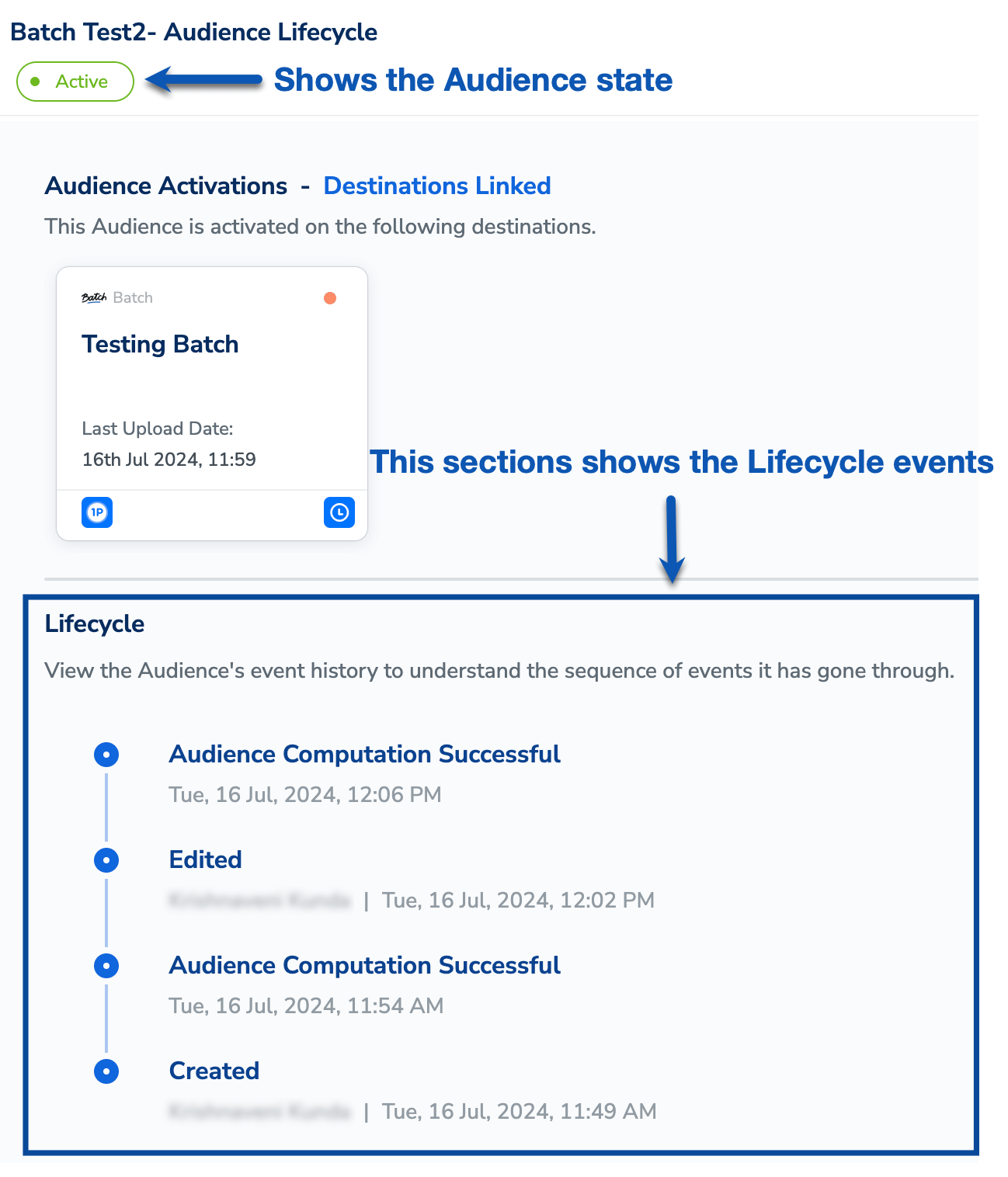
In the Audience Lifecycle screen, you can track the various states an audience transitions through, such as when it is created, edited, paused, resumed and more. You can also view lifecycle events based on actions performed on the audience, as well as events related to the audience’s activation status. The Audience Lifecycle feature provides a detailed view of all events, including timestamps and the individuals responsible for each event, as shown in the image below.
Audience States
The table below outlines the various states an audience can transition through.
| Audience State | Description |
|---|
| In Progress | When the audience is being created or saved |
| Paused | When the audience is paused |
| Edited | When the audience is being edited |
| Published | When the audience is successfully created |
| Activation Removed | When the audience is deactivated or removed from activation |
| Draft | When the audience is saved as a draft |
| Failed | When the audience processing fails due to a technical issue |
| Active | When the audience is activated through linking to a destination, A/B testing, or membership refresh |
| Resumed | When the audience is resumed from a paused state |
Lifecycle Events
Audience Lifecycle Events Based on Actions
The table below outlines the different lifecycle events based on the actions performed on the Audience.
| Lifecycle Event | When It Occurs | Artefacts Shown |
|---|
| Created | When the audience is saved | User Name and Timestamp of the event |
| Draft Created | When the audience draft is saved | User Name and Timestamp of the event |
| Paused | When the audience is paused | User Name and Timestamp of the event |
| Edited | When the audience is edited | User Name and Timestamp of the event |
| Draft Edited | When the audience draft is edited | User Name and Timestamp of the event |
| Resumed | When the audience is resumed | User Name and Timestamp of the event |
| Re-executed | When the audience is re-executed from the backend due to support intervention | Support Team and Timestamp of the event |
| Audience Computation Successful | When the audience computes successfully | Timestamp of the event |
| Audience Computation Failed | When the audience computation fails | Timestamp of the event and the Failure reason |
Audience Lifecycle Events Based on Activation Status
The table below outlines the different lifecycle events based on the audience’s activation status.
| Lifecycle Event | When It Occurs | Artefacts Shown |
|---|
| ActivatedLinked to ‘X’ destination(s) | When the audience is linked to destination(s) | User Name and Timestamp of the event |
| ActivatedMembership refresh enabled | When Membership Refresh is enabled | User Name and Timestamp of the event |
| ActivatedDeletion enabled | When a delete audience is created | User Name and Timestamp of the event |
| Activation UpdatedLinked to 1 destination(s) | When an additional destination is linked to the audience | User Name and Timestamp of the event |
| Activation Updated1 destination removed | When a destination is removed from the audience | User Name and Timestamp of the event |
| Activation UpdatedLinked to 1 destination, 1 destination removed | When a destination is linked and removed in the same request | User Name and Timestamp of the event |
| Activation UpdatedMembership refresh updated | When Membership Refresh Frequency is changed | User Name and Timestamp of the event |
| Activation UpdatedMembership refresh disabled | When Membership Refresh is disabled | User Name and Timestamp of the event |
| Activation UpdatedDeletion frequency updated | When a delete audience’s frequency is updated | User Name and Timestamp of the event |
Last modified on February 26, 2026