

- Mobile Advertising IDs (MAIDs): MAIDs are unique identifiers associated with mobile devices. They allow organisations to target customers specifically on mobile platforms. For example, an organisation may use MAIDs to send targeted advertisements or push notifications to users of a mobile app.
- Email addresses: Email addresses are widely used as output identifiers to target customers through email marketing campaigns. Organisations can send personalised emails to customers based on their email addresses. For instance, a company may send promotional offers or newsletters to customers’ email addresses.
- Phone numbers: Phone numbers can be used as output identifiers for targeting customers through SMS or phone-based marketing campaigns. Organisations can send text messages or make phone calls to customers using their phone numbers. For example, a business may send text alerts or promotional messages to customers’ phone numbers.
How to Select the Output Identifiers?
Once you have dragged and dropped the destination or created a new destination to which you want to push your Audience. In the Destination Settings window, perform the following steps:1
Under Choose your Output IDs to send to destination, all the Output Identifiers that are accepted by the platform are populated. The Output IDs can be MAIDs, Cookies, email addresses and so on. By default, all the identifiers displayed are selected. You can click a particular Output Id to deselect it. In the below example, Appnexus cookie is deselected. Therefore, only the selected Identifiers are used for targeting customers over the platform.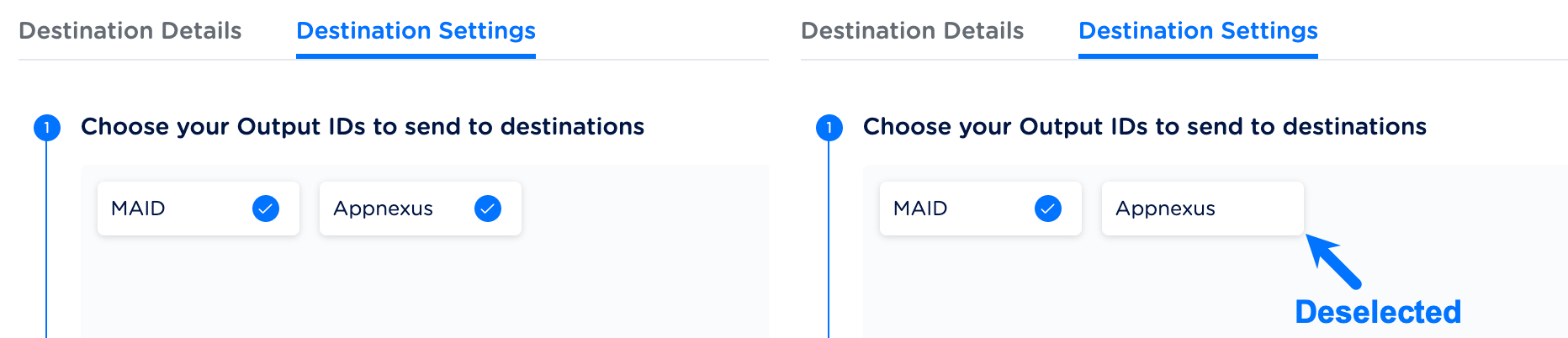
2
If there is an ID that has no data, either due to non-ingestion or non-mapping. Then, the ID is greyed out and is made unavailable for selection.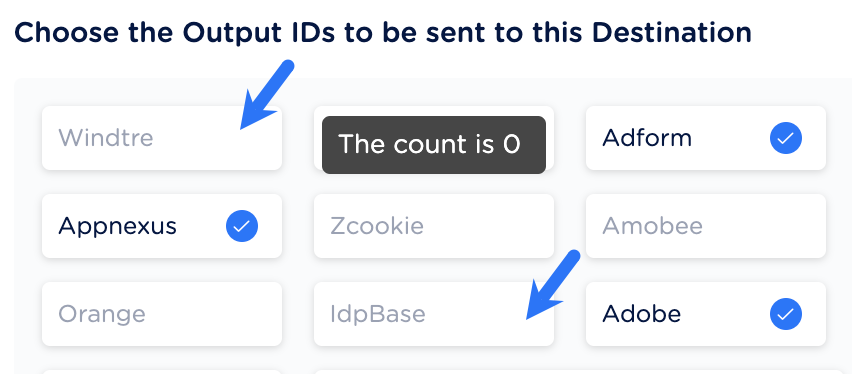
3
Proceed to the Choose the data to be sent to this Destination section.
Understanding How the Choose Output Identifiers
The Output Identifiers are populated based on the platforms selected for the organisation. To understand how to choose the Output IDs, let’s take an example, suppose the client has provided two email addresses, one personal and one business. However, the chosen platform only accepts email addresses in a specific format, such asSHA256 lowercase. In this case, the user can choose the business email address and deselect the personal email address to ensure compatibility with the platform’s requirements.