

What’s New in Q1 of 2024?
Learn about the new features released in Q1 of 2024.1. Enhancements in Consent Orchestration
The below options are now available in Consent Orchestration.1.1 Added Option to Update the Consent/Marketing Preference as “Not Given”
(18-01-2024) Previously, only Yes or No options were available for configuring the Consent or Marketing preference for a customer. When there was no explicit consent recorded for the customer, it resulted in null value being stored for their consent attribute in Zeotap. Null value, which is typically interpreted as a No can avoid the customer from being targeted. To prevent this, we have introduced Not Given as one of the conditions for the rule. In addition, you can define the action for Not Given as per your use case.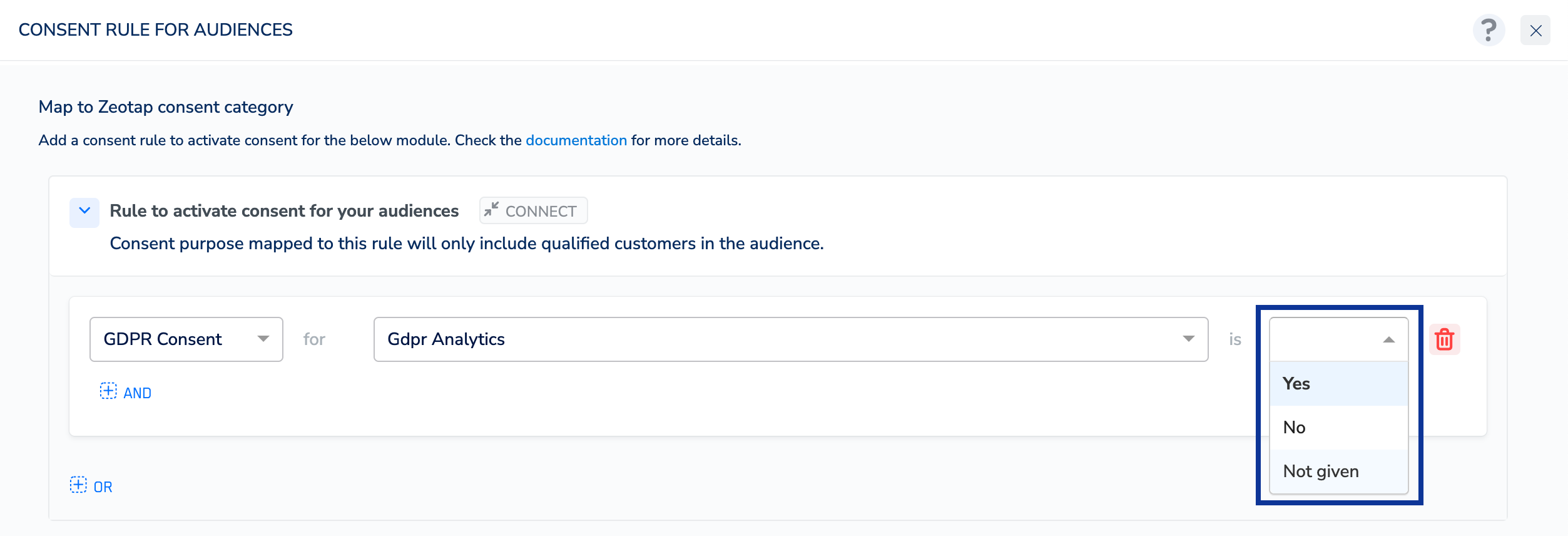
2. Audiences
The below features are now available in the Audiences application.2.1 Support for Objects and List/Array of Objects in Audiences
(07-03-2024) We have added support for Objects and List of Objects attributes within the Audiences module. This helps you to define your Audience based on these attributes that can hold a JSON object or array of JSON objects that contains one or more key-value pairs, also called properties. Note that You can choose Objects and List of Objects for “Profile Attributes” and “Event Attributes” only. To learn more about how these attributes work, refer here.2.2 Configure Audience Refresh Frequency
(18-01-2024) We have added additional options to effectively configure the Audience Refresh Frequency. With the deployed enhancement, you can now choose the frequency at which the Audiences are refreshed and sent to Destinations. Use Start Refresh From to set the refresh start date and time (hours only), Refresh Untilto set the refresh end date and Refresh Every to set the frequency of the refresh. You can choose intervals in days, weeks or months. Note that the Audience activates upon linking it to a Destination. However, the subsequent refresh of the Audience commences from the configured refresh date and time only. In addition, the refresh can commence within four hours from the designated refresh start time. For example, in the below image, the refresh is scheduled to commence on Jan 24th, 2024, at 12 AM. Therefore, after considering the buffer time of four hours, the refresh may begin anytime between Jan 24th, 12 AM and 4AM. To know about how this functionality works in conjunction with other options on the Destination Settings window, refer here.3. Sources Integrations
The below Sources are now available in the Zeotap CDP App.3.1 Enhancements in Salesforce CRM Source
(20-02-2024) Salesforce CRM now supports five standard objects for data storage: Account, Contact, Lead, Case, and Opportunity. In addition, you can specify the type of data you wish to ingest, whether it be customer data or non-customer entity data. Further to it, you have the option to choose between a full fetch, which consistently retrieves data according to the configured sync frequency, or a delta fetch, which gathers incremental updates based on the sync frequency settings. For more information about the source, prerequisites and steps for source creation, refer here.3.2 Airship (Batch) Source
(16-01-2024) Airship (Batch) is a customer engagement platform that streamlines data retrieval from Airship to Zeotap, consolidating user IDs and attributes seamlessly. This integration serves as a conduit for unifying user identities and critical data from Airship into Zeotap’s platform, creating a unified user profile repository. Integrated with Zeotap, its allows you as a business to leverage access to various user channel IDs, such as Android and iOS, enabling targeted push notification campaigns. To know more about how to create a Airship (Batch) Source, refer to Create an Airship (Batch) Source.3.3 Airship Real-Time Data Streaming Source
(16-01-2024) Airship is a customer engagement platform that helps marketers to deliver personalised and relevant experiences to their customers across multiple channels and touchpoints. Integrated with Zeotap it enable marketers to engage with their customers in real-time and at scale. To know more about how to create Airship Real-Time Data Streaming Source, refer to Create an Airship Real-Time Data Streaming Source.3.4 Batch Source
(08-02-2024) Batch is a mobile marketing automation platform that helps businesses engage with their users through personalised messaging across various channels such as push notifications, email, SMS and in-app messages. Integrated with Zeotap, it provides tools and features to create targeted campaigns, analyse user behaviour and optimise communication strategies. To know more about how to create a Batch Source, refer to Create a Batch Source.3.5 Cleverpush (Batch) Streaming Source
(08-02-2024) Cleverpush is a platform designed for push notifications across various digital channels. It allows various digital channel owners and marketers to send targeted and personalized push notifications to their channel visitors, engaging them with relevant content, promotions, updates, and announcements. This integration let you fetch information related to subscribers of a channel such as the subscriptionID, channelID, created_at, country, segments and more. To know more about how to create a Cleverpush (Batch) Source, refer to Create a Cleverpush (Batch) Source.3.6 Cleverpush Real-Time Source
(08-02-2024) Cleverpush enables you to deliver instantaneous notifications across diverse platforms. It facilitates rapid dissemination of time-sensitive information and promotions. Integrated with Zeotap, it enables marketers to engage with their customers in real-time and at scale. This integration lets you fetch information related to subscribers of a channel such as the subscriptionID, channelID, created_at, country, custom attributes, segments and more. To know more about how to create a Cleverpush Real-Time Source, refer to Create a Cleverpush Real-Time Source.4. Destination Integrations
The below Destinations are now available in the Zeotap CDP App.4.1 Adform DMP
(28-03-2024)Adform DMP (Data Management Platform) is a solution within Adform’s advertising platform that allows marketers to collect, analyse and activate their data to improve their advertising campaigns. With this integration, you can create and upload segments to the Zeotap CDP seat ID of the Adform account. To know more about how to create a Adform DMP Destination, refer here.4.2 LaunchDarkly
(28-03-2024) LaunchDarkly is a feature management platform that empowers development teams to safely deliver, control and measure their software through feature flags. With LaunchDarkly, you can run experiments on any feature flag. This Destination allows you send the segments created in Zeotap CDP to be used in LaunchDarkly feature flags. To know more about how to create a LauchDarkly Destination, refer here.4.3 Reddit
(28-03-2024) Reddit is a social media platform that offers a range of advertising solutions to help marketers reach their target audience through Reddit Ads Manager. Using this integration, you can push the data from Zeotap CDP to your S3 bucket and later activate the segments in the Reddit platform to fulfil your business requirements. To know more about how to create a Reddit Destination, refer here.4.4 Neodata
(28-03-2024) Neodata provides data-driven solutions for businesses, particularly in the realm of advertising and marketing. They offer various services related to data analysis, audience segmentation, targeting, and optimisation to help businesses make informed decisions and improve their marketing strategies. This integration combines rich customer data with Neodata’s analytics expertise. By merging data sources and analysis capabilities, businesses gain deeper insights into customer behavior for more effective targeting and personalized marketing campaigns. To know more about how to create a Neodata Destination, refer here.4.5 Emarsys (Real-Time Integration)
(28-03-2024) Emarsys is a marketing automation platform that enables businesses to create personalised marketing campaigns. Integrated with Zeotap, it uses email marketing as the primary medium to deliver highly targeted messages. Thereby, optimising customer engagement and enhancing marketing effectiveness. This integration records customers as contacts in Emarsys in real time during the registration process, enabling you to engage with them effectively. To know more about this integration in Journeys, refer to Emarsys Real-Time Integration.4.6 Enhancements in Braze
Braze is a customer engagement platform that helps marketers deliver personalised messaging and experiences across multiple channels, including email, mobile push notifications, in-app messaging and more. This integration provides a suite of tools and features to help marketers manage customer data, segment audiences and automate campaigns. With the current enhancement, you can now send identifiers and attributes to Braze from Zeotap CDP based on the downstream system (Audiences or Connect) you wish to use for activating your audiences (segments). To know more about this integration, refer here.4.7 Cleverpush (Batch Integration)
(14-03-2024) Cleverpush is a web-based platform that enables website owners and developers to send push notifications to users who have subscribed to receive them. Integrated with Zeotap CDP, it enables marketers to engage with their customers in real-time and at scale. This integration lets you send notifications through mobile applications, websites and emails. To know more about how to create a Cleverpush Destination, refer here.4.8 Enhacements in Emarsys (Connect/Audiences)
Emarsys is a marketing automation platform that enables businesses to create personalised marketing campaigns. Integrated with Zeotap, it uses email marketing as the primary medium to deliver highly targeted messages, thereby optimising customer engagement and enhancing marketing effectiveness. (28-03-2024) This enhancement supports Custom-ID along with email addresses, First Name, and Last Name. Using this, you can map any Custom ID in the Zeotap CDP catalogue field to the custom field you created in your Emarsys account. To know more about this integration, refer here. (14-03-2024) With this enhancement, you can now send identifiers and attributes to Emarsys from Zeotap CDP based on the downstream system (Audiences or Connect) you wish to use for activating your audiences (segments). To know more about this integration, refer here.4.9 Enhancements in Salesforce Marketing Cloud - Data Extension
(08-03-2024) Salesforce Marketing Cloud - Data Extension is a platform support many facets of marketing including multi-channel campaign execution, dynamic customer journeys, pre and post campaign analytics including audience building and segmentation and much more. Integrated with Zeotap, it allows marketers to store, manage and segment their data for use in targeted marketing campaigns. With the current enhancement, you can now send identifiers and attributes to Data Extension from Zeotap CDP based on the downstream system (Audiences or Connect) you wish to use for activating your audiences (segments). To know more about this integration, refer here.4.10 Airship Static Lists & Airship Real-Time Integration
(30-01-2024) Airship is a customer engagement platform that helps marketers to deliver personalised and relevant experiences to their customers across multiple channels and touch points. Integrated with Zeotap, it enable marketers to engage with their customers in real-time and at scale. Note that you can create Destinations for processing data both in batches and real-time. For detailed guidance on creating a Airship Static Lists or Airship Real-Time Integration, refer to the following resources:4.11 Batch (Batch Data & Real-Time Integration)
(30-01-2024) Batch is a mobile marketing automation platform that enables marketers to engage with their mobile app users through push notifications, in-app messaging and email. Integrated with Zeotap, it provides a range of features and capabilities that enable marketers to create personalised and relevant experiences for their users and drive engagement, retention and revenue. Use this integration to send custom audiences to Batch. A custom audience can contain a list of custom user IDs, advertising IDs (GAID or IDFA) or install IDs. Note that you can create Destinations for processing data both in batches and real-time. For detailed guidance on creating a Batch Destination or Batch Real-Time Integration, refer to the following resources:4.12 RTB House
(01-02-2024) RTB house is a DSP platform that specialises in targeted advertising including retargeting and real-time bidding (RTB) strategies. Integrated with Zeotap, helps the clients to send the segments created in Zeotap CDP to the S3 bucket provided by RTB house. To know more about how to create a RTB House Destination, refer here.5. Catalogue Enhancements
The below enhancements are now available in Catalogue.5.1 Hide Catalogue Fields
(19-01-2024) You can now hide unwanted Catalogue fields for your Organisation by selecting the Hide option next to the desired Catalogue field entry. Hiding an attribute from the Zeotap Catalogue affects its visibility in the downstream modules like Audience, Journeys, Source Mapping and Destinations for new creations. However, it continues to exist in the backend database schema. If an attribute is already in use in any of the downstream modules mentioned above, then it continues to function without interruptions. However, the system prompts appropriate actions based on the application/module for any edits. For example, if you choose a hidden attribute while editing a source, then the system prompts you to remove that attribute before saving the changes. Alternatively, you can also unhide the attribute in the Catalogue application. For more information about the Hide functionality, refer here.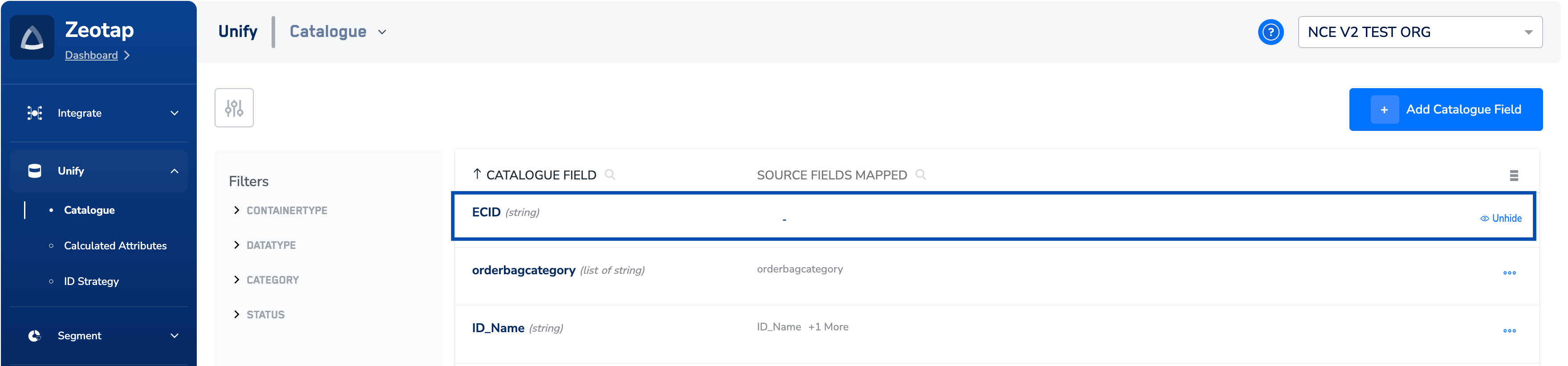
5.2 Introduced Edit Source Mapping Functionality
(19-01-2024) We have added the Edit Mapping option to the Catalogue, enabling you to modify the mapping of an existing source. Access this option from the PREVIEW DATA or CATALOGUE MAPPING tabs on the created source. Use this option, especially for addressing issues such as mapping the wrong field or incorrectly mapping a field with the wrong data type, leading to ingestion failures. Note that the data ingested before editing the mapping is unaffected. However, upon saving the new mapping, data ingestion occurs according to the updated mapping. For more information about this functionality, refer here.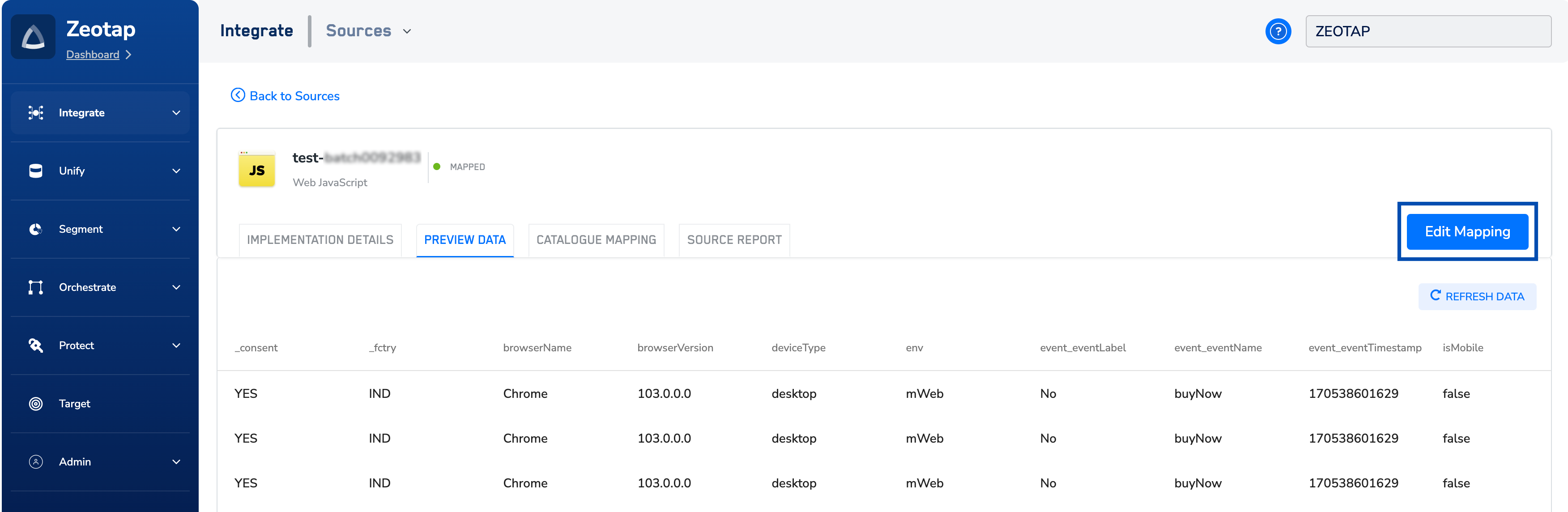
5.3 Edit Display Name for Catalogue Fields
(19-01-2024) We have Introduced the capability to edit display names for Catalogue fields, allowing you to enhance clarity and align with your business attributes by customising field names. For example, you can rename the field “email” to “Primary Customer Email” to improve clarity for your customers. The modified attributes will be available for activation across downstream modules. For more information about how to use this functionality, refer here.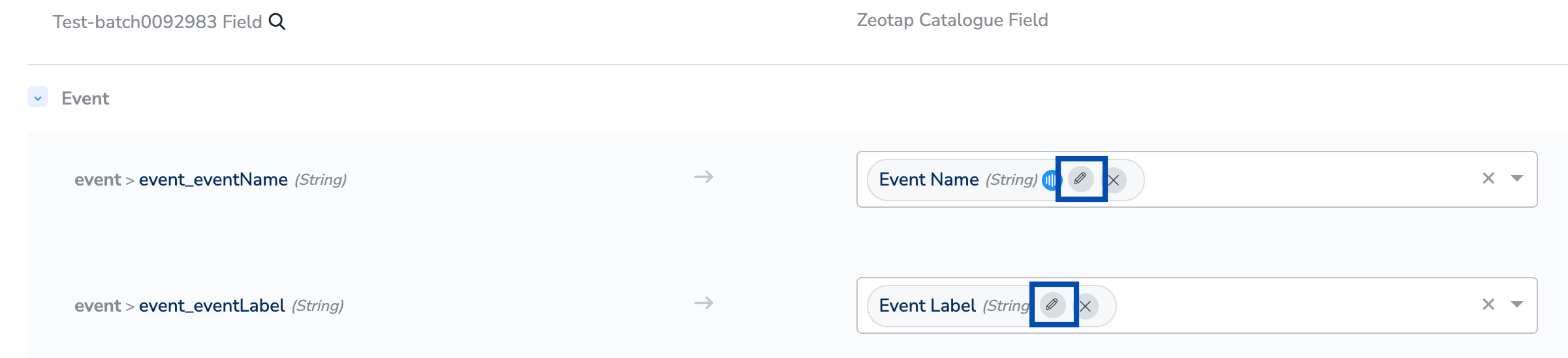
5.4 Support for List (Array) of Strings/Integers/Double
(10-01-2024) We have added support for new data types List (Array) of Strings/Integers/Double in the Catalogue. This represents a type of attribute in the Zeotap catalogue which can hold any incoming data that is of the type string, integer or double or a List of string integer or double. This incoming data is stored as a list of values against a user profile. For instance, you can map a list of incoming source data of cars or productcode to List type catalogue fields. That is, the the values for car is mapped to List of strings and values for the productcode is mapped to List of integers and the result is as shown below. List of String cars:[“Ford”, “BMW”, “Fiat”] List of Integer Productcode:[1102,1105,1456] Note that you can also map a single value string, integer and double and store it as a List in Zeotap. Let’s consider an example to understand this better. Imagine you have incoming data of Cars for the UserID: U1 as shown in the table below.| USERID | CARS |
|---|---|
| U1 | Ford |
| U1 | BMW |
| U1 | Fiat |
5.5 Support for the Data Types “Object” and “List of Objects”
(10-01-2024) We have added support for new data types Object and List of Objects in the Catalogue. Object and List of Objects represent attributes in Zeotap Catalogue that can hold a JSON object that contains one or more key-value pairs, also called properties. In the following example, producItem is an Object in a user profile with properties, ProductName, price and photo as shown below.Code
NoteFor more information about how and when to use the data types, Object and List of Objects, refer here.