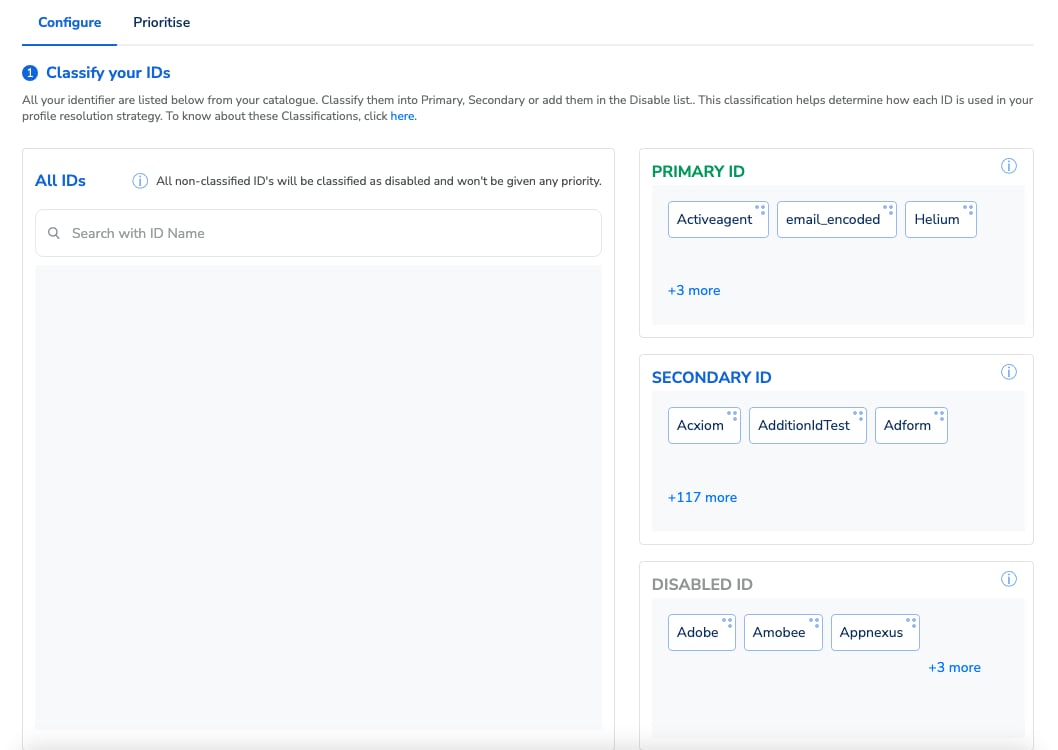
When a new data record is received, based on how you have classified your identifiers, the system looks up the existing profiles and performs the actions mentioned below.
SCENARIOSCENARIOACTION
If a Primary ID existsMatch not foundCreate a new user profile. (UCID)
If a Primary ID existsOne match foundFor the same UCID, enrich the existing profile with user traits,consent, identifiers and events received in the record.
If a Primary ID existsMore than one match foundReconciliation logic
  • The UCID that was created first is picked as the master UCID.

  • All the other UCIDs are reconciled to the master UCID.

  • All the corresponding user traits, consent, identifiers and events are mergedinto the master UCID.

If only a Secondary ID existsMatch not foundCreate a new user profile (UCID).
If only a Secondary ID existsOne match foundEnrich the existing profile with user traits, consent, identifiers,events and more.
If only a Secondary ID existsMore than one match foundReconciliation logic
  • The UCID that was created first is picked as the master UCID.

  • All the other UCIDs are reconciled to the master UCID.

  • All the corresponding user traits, consent, identifiers and events are merged into the master UCID.

If all the incoming IDs are disabled or no ID is found in the recordReject the record and log it as an erroneous record
Note:The above table explains a scenario where the ID prioritisation feature is not used. That is, all the IDs within a classification (Primary or Secondary) are treated the same.Disable ID is a new feature and is currently available in the Beta phase. However, if you want to be a part of our Beta phase, then reach out to your Zeotap POC.
Example We are considering the following ID classification to further explain the use cases for ID Classification:
IDENTIFIERCLASSIFICATION
User IDPrimary
EmailPrimary
MAIDSecondary
GA client IDSecondary
TTD CookieDisabled
Note:In this use case, the priority of these IDs are same within their classification.
USE CASEDATA SCENARIOWHAT DOES ZEOTAP DO?PROFILE CREATED
User A logs into the Brand’s mobile app 1User ID: U1

Maid: M1
1. Among the identifiers received, U1 is a Primary identifier.

2. The system looks up a match for U1. 

3. With no match found, it creates a new UCID: Z1.

4. It also creates linkages with all the other identifiers and maps the other information like profile, event and consent and more received in the record.
Z1 {User ID: U1Maid: M1}
User A logs into the Brand’s app 1 using a different mobile deviceUser ID: U1

Maid: M2
1. As U1 is a Primary identifier, the system looks up a match for U1. 

2. It finds a match for U1. 

3. It updates the profile, Z1 with the new ID linkages and the other information received.
Z1 {User ID: U1Maid: M2}
User A logs into the Brand’s app 2 using the same mobile deviceEmail: E1

Maid: M2
1. As E1 is a Primary identifier, the system looks up a match for E1.

2. With no match found, it creates a new UCID: Z2.

3. It also creates linkages with all the other identifiers and maps the other information like profile, event and consent and more received in the record.
Z2 {Email: E1Maid: M2}
User A logs into the Brand’s websiteUser ID: U1

Email: E1

GA Client ID: G1

TTD cookie: T1
1. As both U1 and E1 are Primary IDs, the system looks up for a match with both the IDs and finds Z1 and Z2.

2. In this case , the profile with the first created UCID that is, Z1 is retained as the master profile and the other matched profile, that is Z2 is merged to it.
Z1 {User ID: U1Email: E1Maid: M2GA Client ID: G1TTD cookie: T1}
-TTD cookie: T1If a record contains no Primary or Secondary identifiers and  just has the disabled identifiers or no identifier at all, then Zeotap rejects such a record and logs it as an erroneous record.No profile is created or updated
Last modified on February 26, 2026