

What TTL is
Time-to-Live (TTL) is a strategy that defines the lifespan or expiration period of data within a system. It specifies the duration for which data, particularly identifiers (IDs), remains valid and accessible. The TTL strategy is crucial for managing data freshness, security, and compliance with privacy regulations. TTL is set per catalogue field, in Advanced Settings on the field form, and it applies to identifier fields and to consent fields. Two identifiers can therefore carry different TTLs, even when they belong to the same group. For a summary of every advanced setting, see Understand the Advance Fields.Persistent IDs and Non-Persistent IDs
The following are the two types of identifiers available in the system:- Persistent IDs: These identifiers, like customer-specific IDs, are intended to persist indefinitely, often set to “Forever.” They have a longer TTL, ensuring their continuous availability and usability. Examples of Persistent IDs include email addresses, cellphone numbers, user identifiers and more.
- Non-Persistent IDs: Unlike persistent IDs, these identifiers have a defined TTL after which they expire. The duration of their validity is determined by the TTL strategy. This ensures that outdated or irrelevant data is not retained unnecessarily, maintaining data freshness and optimising system performance. Examples of Non-Persistent IDs include TTD Cookies, Adobe Cookies, Zeotap Web ID and more.
TTL range and default values
Forever is the default value on the field form, and you can set any value from 1 to 3650 days instead. The below table shows the default TTL values for cookies and identifiers in the system.Change the TTL for an identifier
You can configure the TTL values for identifiers based on your requirements. The system retains the identifier according to the configured TTL. This flexibility allows you to align data retention with your privacy policies and user engagement strategies. TTL stays editable after a field has been added — see Edit a Catalogue Field. To change the TTL for an identifier, go to Catalogue and perform the following steps:1
On the Catalogue screen, locate the Identifier for which you want to modify TTL.
2
Click the three dots next to the identifier and click Edit.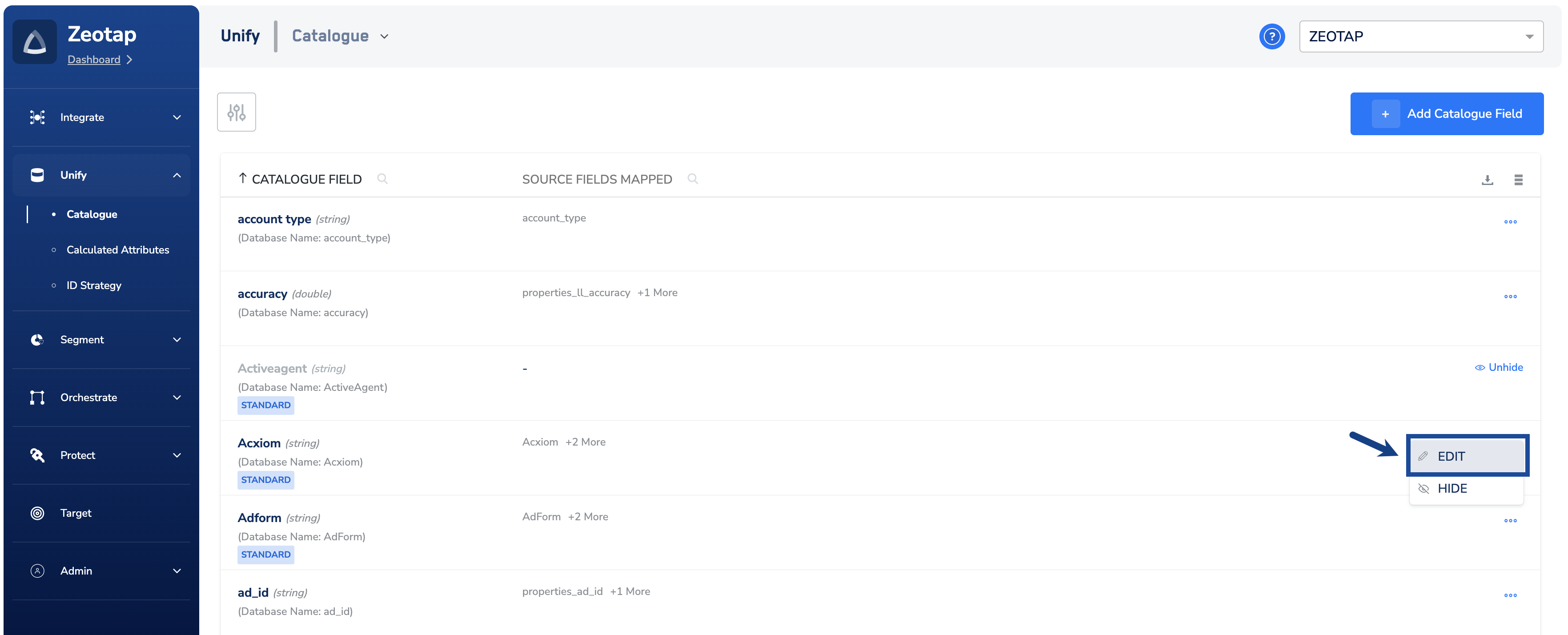
3
In the window that appears, navigate to Advanced Settings > TTL.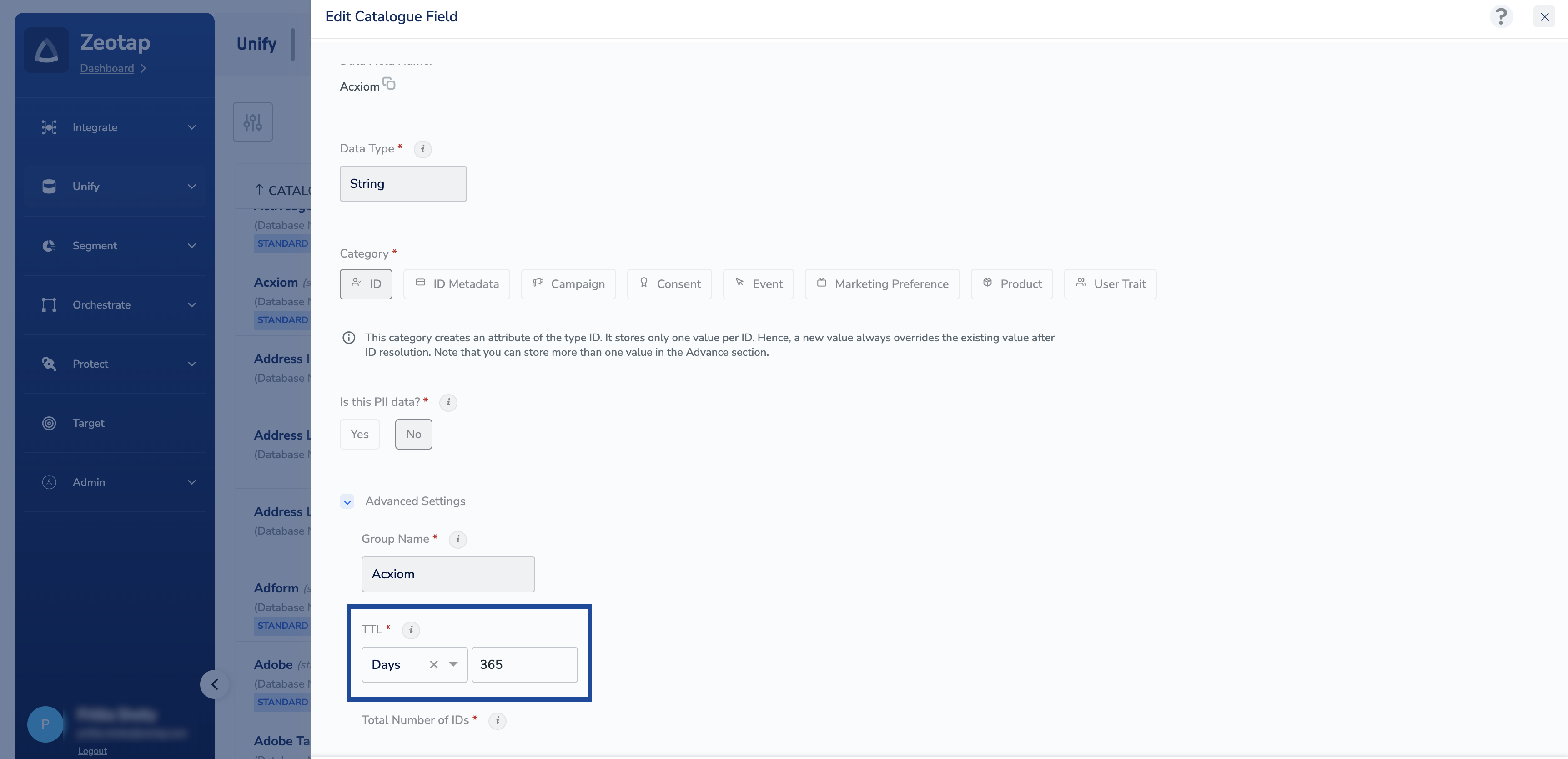
4
Update the TTL as needed. You can either choose Forever for persistent IDs or specify the number of days for non-persistent IDs.
5
Review the entered value and click Save.
NoteA change to a field’s TTL applies to the data ingested from that point onward. Values already stored keep the expiry that was calculated when they were ingested.
How TTL interacts with ID reconciliation
TTL governs how long an identifier is stored. It does not govern the profile that identifier belongs to, and it does not remove the profile’s other identifiers.- The clock runs from the last update. When an identifier is ingested it is stored with an expiry derived from its TTL. For example, if the system ingests a TTD cookie ‘123’ on May 1, 2023, with a TTL of 90 days, then its expiry will be set to July 30, 2023. If the system ingests the same ID ‘123’ again on May 2, the expiry date in the existing user profile for the TTD cookie ‘123’ updates to July 31, 2023. Every fresh record for that identifier moves its expiry forward.
- An expired identifier leaves the profile; the profile stays. When the identifier expires it is dropped from the user profile. The unified customer profile and its Unique Customer ID are unaffected, as are the profile’s other identifiers, traits and events.
- A record whose identifiers have all expired does not create a new profile. Expiry applies to the stored identifier value, so if none of the identifiers in an incoming record is still held, that record does not produce a new profile.