Prerequisites
Before using this API, ensure the following conditions are met:
- Active Emarsys Account: You must have an active Emarsys account with administrative privileges.
- API User Credentials: You must have already created an API user within the Emarsys platform and have access to its username and secret (API Key).
- Correct Permissions: The API user must be granted the appropriate permissions for all endpoints listed in this documentation. This is configured in the Emarsys UI under Management > Security Settings > API Users.
- Existing Data: The Emarsys account should have existing contacts, contact lists, and configured external events to ensure the API calls return meaningful data.
Creating API Credentials (OAuth 2.0 Method)
To interact with the Emarsys v3 API, your application must first authenticate itself and obtain a temporary access token.
Step 1: Create the API Credentials in Emarsys
These are the permanent, long-term credentials for your application that must be stored securely.
-
Action:
Log in to the Emarsys application as an Account Owner.
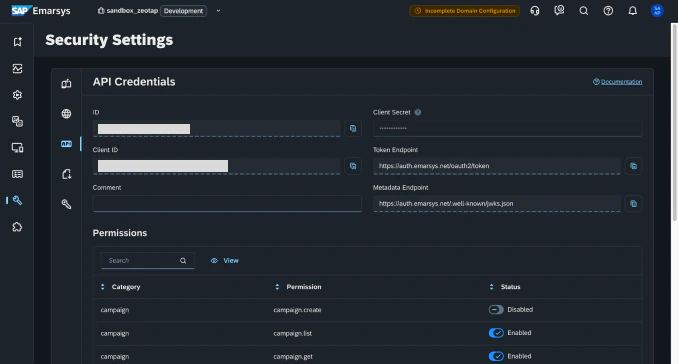
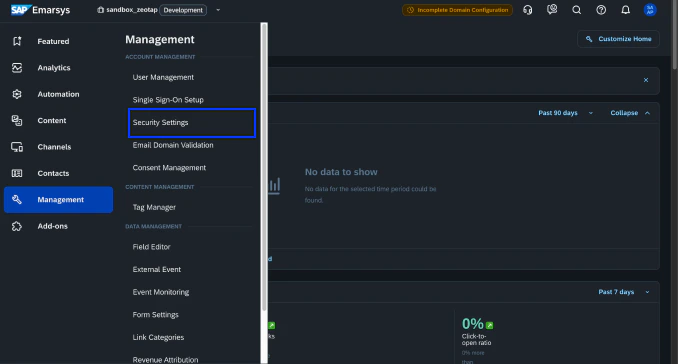
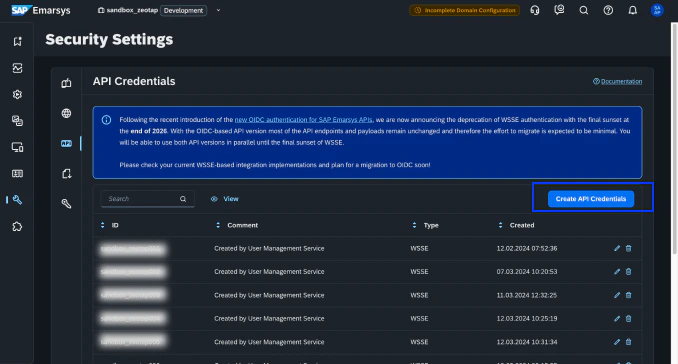
Navigate to Management > Security Settings. Go to the API Credentials tab and click Create API Credential. The system will generate a Client ID and a Client secret.
Critical WarningThe Client secret is displayed only once upon creation. You must copy and save it to a secure location immediately. If you lose the secret, you cannot retrieve it and will need to generate a new set of credentials.
Last modified on February 26, 2026


 3Go to the API Credentials tab and click Create API Credential.
 4The system will generate a Client ID and a Client secret.