ZEOTAP
Zeotap is a Customer Intelligence Platform (CIP) that helps companies better understand their customers and predict behaviours, to invest in more meaningful experiences. We enable brands to build on a nucleus of first-party data to win new customers and grow their loyal base. Our independent but integrated modules include customer data unification, identity resolution, enrichment, analytics/modelling (including in data clean rooms), and activation to 100+ partners in the marketing ecosystem. Recognized by fiartner as a “Cool Vendor” (2020) and by AdExchanger as the “Best Data-Enabling Technology” (2019), our platform meets the highest enterprise data privacy and security standards, including fiDPR, ISO 27001and CSA STAR. We serve the world’s top brands, agencies and publishers across a dozen countries in Europe, North and Latin America, and APAC.ID+ INITIATIVE
Zeotap is also the founding member of ID+, a global universal ID solution. The ID+ solution is identifier-agnostic and empowers the marketing ecosystem ––brands, publishers, and vendors alike–– with a privacy-compliant mechanism to overcome identity resolution challenges arising from third-party cookie/identifier restrictions and increasingly stringent regulations across the world.INTEGRATING WITH PREBID
When a user visits a Publisher website, the already stamped IDP cookie must be passed in the Bid Request. A Publisher usually has a Header-Bidder (HB) solution integrated. Prebid is an open-source HB solution. Zeotap has integrated with Prebid to pick every such IDP stamped cookie and send it to the SSP. Prebid helps to create a proper Bid request consisting of all the required information in terms of the Bidding Process.Note:Ensure that your bidder adapter can listen to Zeotap ID+. To know more about the integration of bidder adapters and user ID modules refer to the Prebid document here.
ID+ RESOLVER FOR SUPPLY-SIDE PLATFORM (SSP)
Zeotap’s ID+ solution for Supply-Side Platform (SSP) includes the ID+ Resolver Service that sits on the SSP server. The Resolver Service allows SSP to decode the ID+ received from the Publisher into a Demand-Side Platform (DSP) specific ID+ that is passed to the respective DSPs in the Real-Time Bidding (RTB) request. The DSP specific ID+ can then be used to target the underlying users with the help of Zeotap. An SSP may be connected to multiple DSPs. The SSP needs to inform Zeotap for which all DSP IDs it needs the tokenized ID+ value. For every requested DSP, Zeotap performs a set of operations and builds a tokenized ID+.
INTEGRATING RESOLVER SERVICE ON SSP SERVER
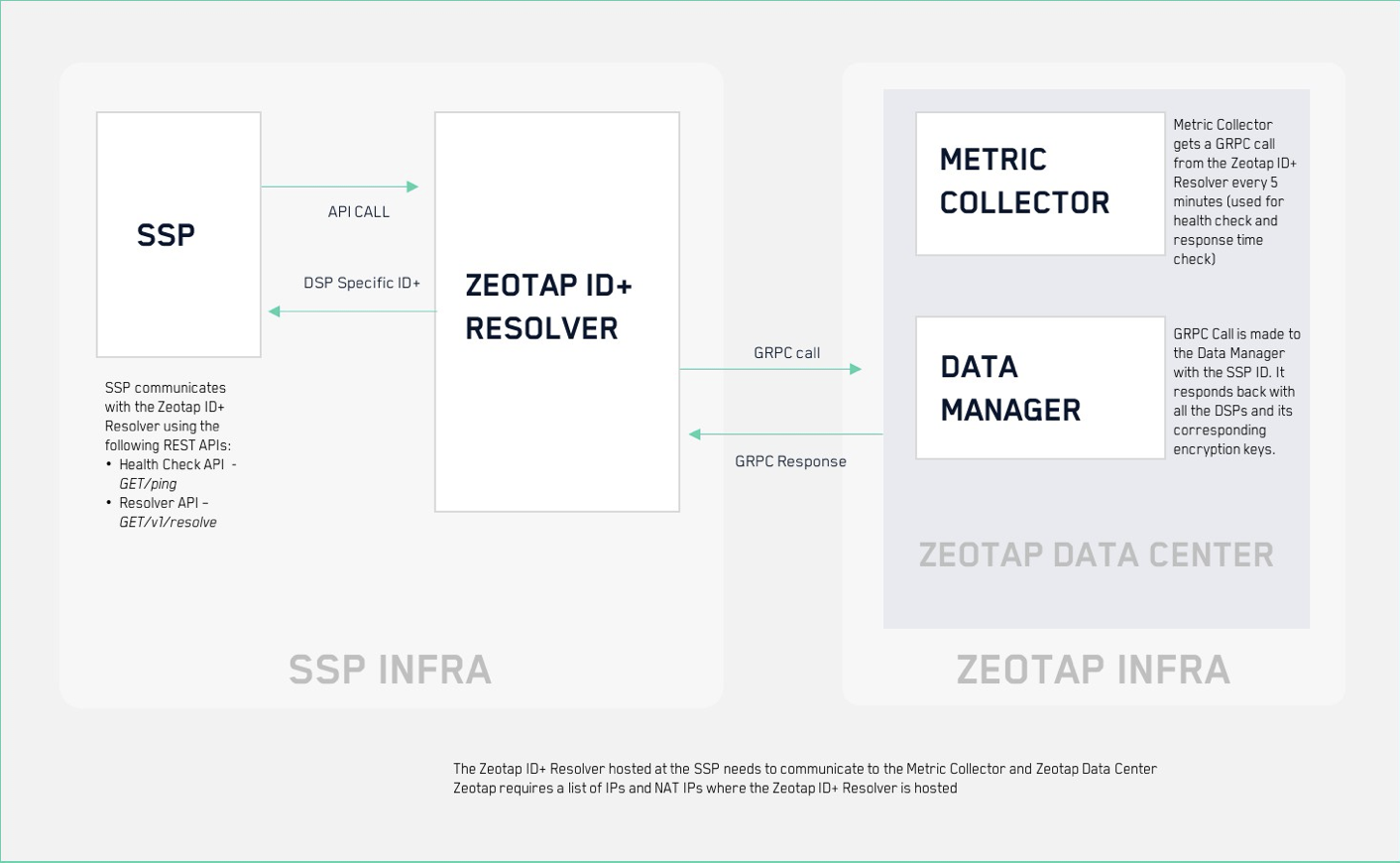
This section explains the steps involved in the integration process at a high level.Zeotap provides a Docker image of the ID+ Resolver Service.This docker image is installed on the SSP server that receives the Ad requests. This step ensures low latency for ID+ resolution. To know more about how to run the Docker container, refer to the Installing and running the Docker Container section.
ID+ Resolver Service communicates with the client (SSP service) using an API request for easy integration.
SSP sends details such as the IDP cookie that it received and a list of DSPs for which the corresponding ID+ token is required. To know more about this, refer to the Input to Resolver Service section.
ID+ Resolver Service responds with an array of objects having the DSP ID and the resolved ID+ token specific for that particular DSP. To know more about this, refer to the Output of Resolver Service section.
ID+ Resolver Service also makes fiRPC call (secured using Transport Layer Security (TLS)) client connection to the Zeotap Master Data server that performs the following functions:
- Update the metadata specific to DSP specific resolution configuration
- Send stats or diagnostic information to convey service health
Note:When a user opts out from an SSP, then the SSP does not have to make a call to the Resolver Service.

INSTALLING AND RUNNING DOCKER CONTAINER
The Resolver Service makes a call to the Zeotap Data Center using TLS certificates that are part of the Docker Container. The following are the commands to install and run the Docker Container:docker login– This command asks for username and password. Reach out to your Zeotap Product Operations Manager (POM) for the username and password.docker run -d -e SSP.ID=${SSP_ID} -p [PORT]:80 --cap-add IPC_LOCK zeotapgmbh/resolver:<tag>– Reach out to your Zeotap Product Operations Manager (POM) for the tag. The table below explains the variables used in this command.
Note:An SSP must give IP addresses of servers or NAT IP where they are hosting the Docker application (for both testing and production environments). Only the whitelisted IPs can communicate with the Zeotap Data Center.Security patches are done immediately and informed on an ad hoc basis so that the patches can be pulled from Docker Hub. However, the regular feature updates are done once every month.
| VARIABLE | DESCRIPTION |
|---|---|
| SSP.ID | This is an environment variable that must be passed to the Docker Container for handshake communication between the Resolver Service and the Zeotap Data Center. |
| PORT | This is the port at which the application runs outside the container. |
| RESOLVER_PORT | RESOLVER_PORT is an optional variable. This is the port at which the application runs inside the container. If the RESOLVER_PORT is not given, then the application runs at the default port 80. Use the following command when you are running the Docker Container with the RESOLVER_PORT: |
docker run -d -e SSP.ID=${SSP_ID} -e RESOLVER_PORT=${RESOLVER_PORT} -p [PORT]:${RESOLVER_PORT} --cap-add IPC_LOCK zeotapgmbh/resolver:<tag> |
COMMUNICATING WITH ZEOTAP DATA CENTER
The Resolver Service communicates with the Zeotap Data Center at regular intervals using the following two components:- Metric Collector - The metric information passed to the metric service is used to track the errors and performance of the Resolver Service at regular intervals. This is to ensure that the Resolver Service performs best to its capacity and we are able to take actions on the errors at the earliest.
- Data Manager - The Data Manager is used to check in, obtain and renew keys to generate the tokenised DSP IDP Cookies.
STARTING RESOLVER SERVICE
Note that the keys are highly sensitive and memory locked into the container. Any attempt to access or modify the key may lead to system wide disruption of the account. As a result, legal measures may be taken. Therefore, before starting the Resolver Service, ensure of the following points:- The coredump must be disabled. The ulimit core is set to 0 (Overridden) by default.
- If the IPC_LOCK capability is not provided, the application cannot start.
INPUT TO RESOLVER SERVICE
The Resolver Service receives the input from SSP in the form of IDP Cookie and/or the DSP IDs. These are then converted to the corresponding DSP ID+ tokens.- Cookie – This is the Zeotap IDP cookie that is stamped on the Publisher page and passed to SSP through the Prebid module or any other Header Bidder solution.
- DSP IDs – While onboarding a SSP into Zeotap, the SSP provides a list of DSPs that it works with along with their DSP IDs. When calling the Resolver Service, one or more of this DSP ID is passed as an input.
- If the DSP IDs parameter is used, then only the provided DSP IDs and their associated ID+ is generated as the output. Zeotap recommends that you provide the DSP IDs in the input request.
- If the DSP IDs parameter is not included, then the Resolver Service returns ID+ for all the available DSPs that are authorized for the SSP.
OUTPUT OF RESOLVER SERVICE
The Resolver Service generates a key value pair of DSP IDs mentioned along with their corresponding IDP cookie. For more information, refer to the Resolver API section.API ENDPOINTS OF RESOLVER SERVICE
This section explains the API endpoints of the Resolver Service in detail.Health Check API
Use the Health Check API to check the health status of the Docker Container.| Status Code | Response from API | Scenario |
|---|---|---|
| 200 | Ok | When the application is up and running |
| 404 | Not Found | When the application is down or the server is not able to start due to some reason |
Resolver API
This is the primary endpoint of the Resolver Service that converts the IDP Cookie to its corresponding DSP IDP Cookies.Metrics API URL: /metrics
| Status Code | Response from API | Use case |
|---|---|---|
| 200 | Ok | When the cookie value is correct and the correct list of DSP IDs/authorized DSP list is passed |
| 204 | No Content | When the cookie value is correct but the wrong value of DSP IDs or unauthorised DSP list is passed |
| 400 | Bad Request | When the cookie value is wrong but correct/incorrect/noList is passed |
| 500 | Internal Server Error | When something has gone wrong |
Code
| Status Code | Response from API |
|---|---|
| 200 | Ok |
| 500 | Internal Server Error |
USING ID+ IN ORTB BID REQUEST
Once the SSP derives ID+ for their respective DSP partner from the ID+ Resolver Service, they can add it to the outgoing bid request. Ensure that the demand-side platform has support for reading it. For example: If SSP and DSP support ORTB 2.5 Format For example: If SSP and DSP support ORTB 3.0 FormatBEST PRACTICES TO OPTIMISE PERFORMANCE
IDEAL CONFIGURATION FOR BEST PERFORMANCE
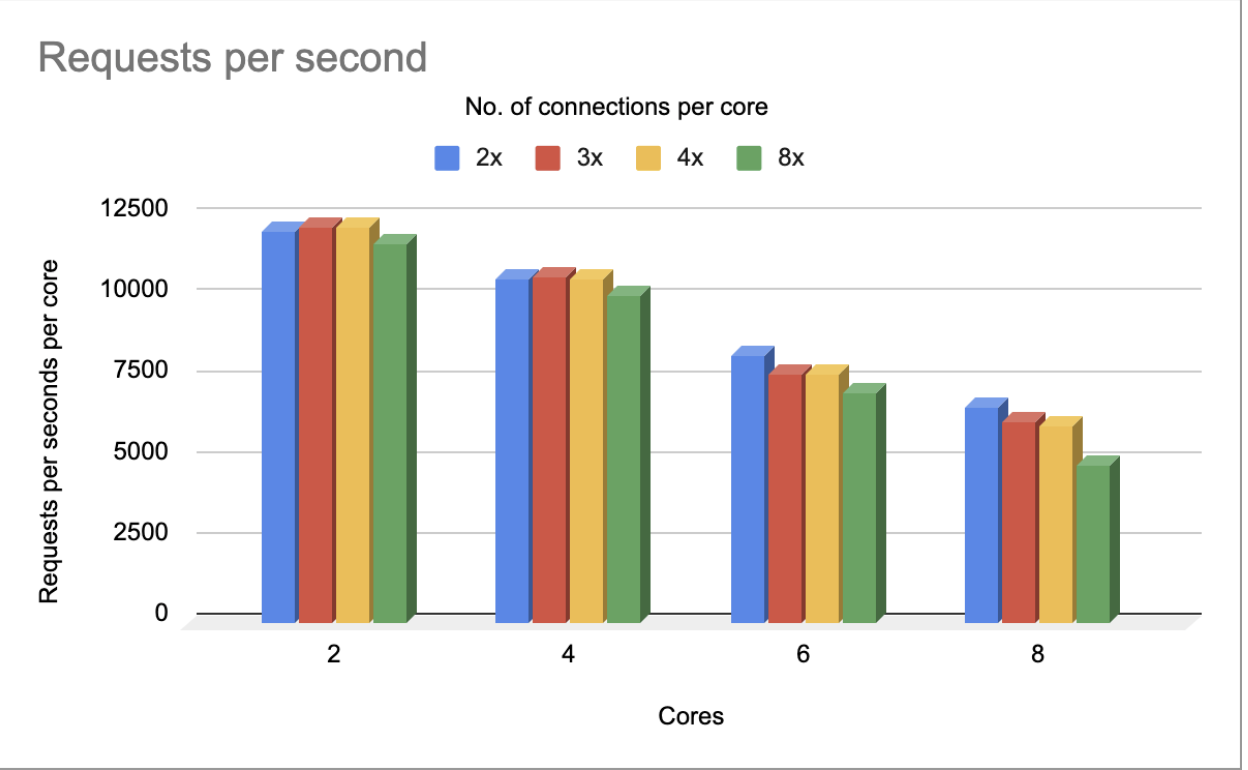
The following is the ideal configuration that we achieved after running our test on 8 cores and 7.2 fiB RAM:- 99 percentile response time of requests within 1 ms
- Mean response time 0.5 milliseconds
RECOMMENDATION TO OPTIMIZE LATENCY
To achieve latency within 1 ms, we recommend that you use 2 cores and 4 parallel keep-alive connections with 5K rps per core.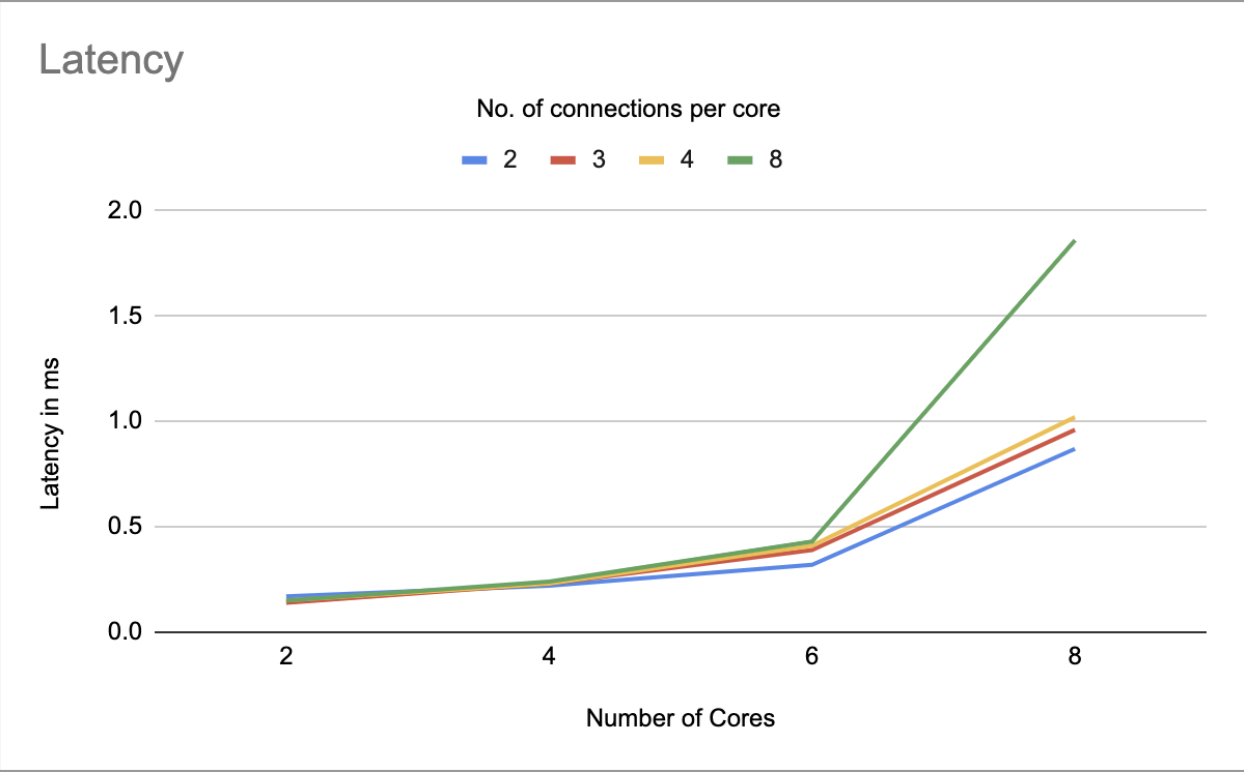
RECOMMENDATION TO OPTIMISE THROUGHPUT
To achieve higher throughput, we recommend that you use 2 cores and 8 parallel keep-alive connections with 7K rps per core. This combination provides latency within 1 ms.