

What is identity resolution?
Your customers show up everywhere — signed in on your website, anonymous on a phone, in a CRM export, in a purchase file from your warehouse — and each of those systems knows them by a different identifier. Identity resolution is the process that decides which of those records belong to the same person and joins them into a single customer profile. Every incoming record is checked against the identifiers already known for your account. If the record matches an existing customer, its events, profile attributes, and consent information are added to that customer’s profile. If it matches nobody, a new profile is created. The result is one profile per customer, holding everything you know about them. You control which identifiers are trusted to make those decisions by choosing an ID strategy — see Types of ID Strategies.What is an identity graph?
The decisions above are made against your account’s identity graph: the set of identifiers Zeotap holds for your customers, plus the linkages between them. A linkage is created whenever two identifiers arrive together in the same record. If a signed-in web session sends both a customer ID and a web cookie, those two identifiers become linked. Whether a later record carrying only that cookie then resolves to the same profile depends on your ID strategy: under the Default strategy every identifier is used for matching, while under a Custom strategy an identifier classified as Secondary keeps that visit on a separate profile. Each customer in the graph is one profile, identified by a UCID, with all of their linked identifiers attached to it. See Types of ID Strategies.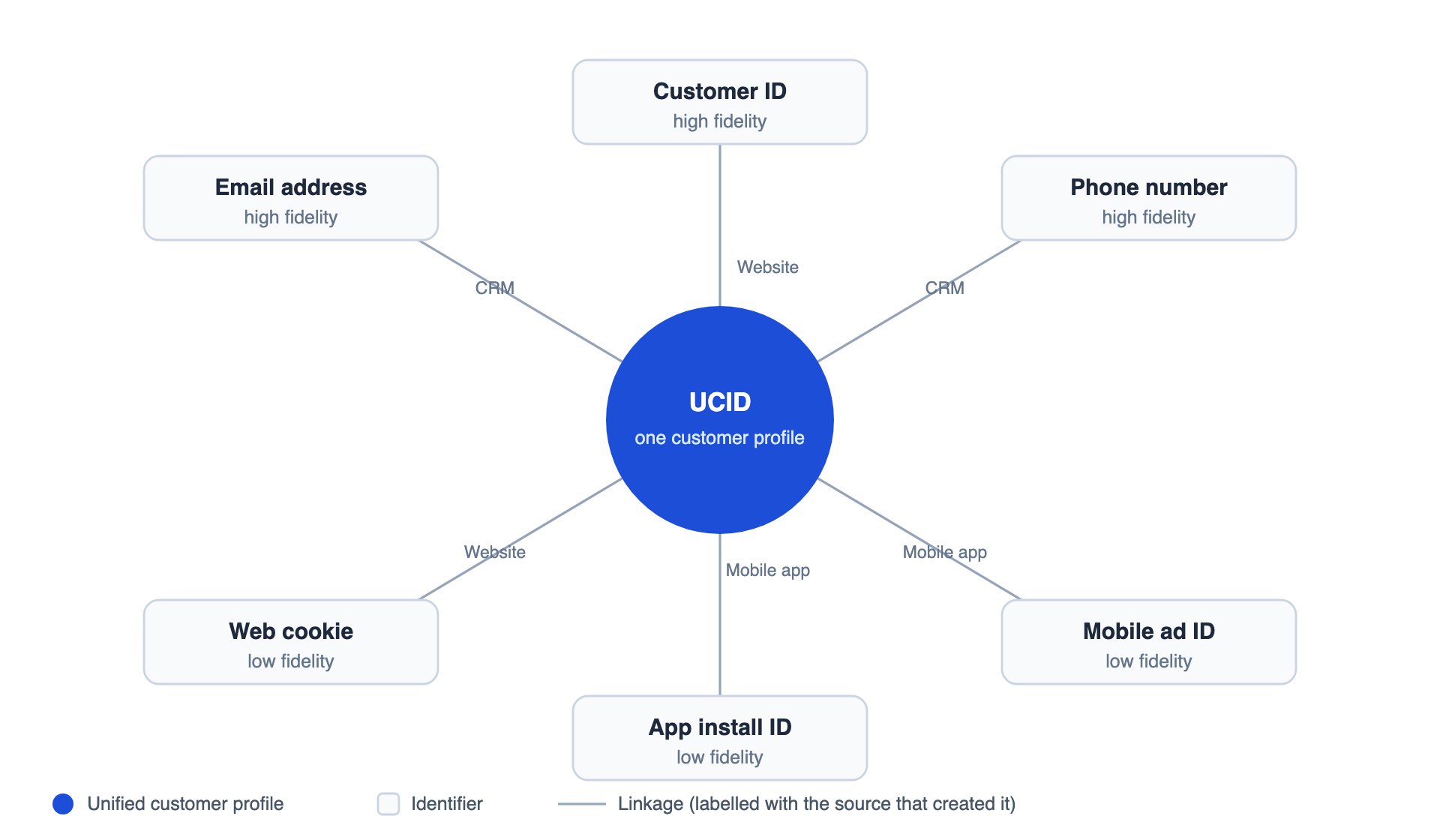
An identity graph: identifiers from different sources, linked together into one customer profile.
The UCID (Zeotap’s persistent identifier)
The Unique Customer ID (UCID) is the persistent Zeotap profile ID created per uniquely identified user. It is tied to all the other identifiers collected for that user across every source you have onboarded, which is what gives you a single 360-degree view of the customer.A UCID is persistent, but it is not immutable. When two profiles turn out to belong to the same person, one of them is merged away — its identifiers, attributes, and events move to the surviving master profile.
ucid is also a reserved field in your catalogue, so a catalogue field with that name cannot be created for any other purpose — see Reserved Catalogue Fields.
Deterministic matching
Zeotap resolves identities deterministically. A record joins a profile only when it carries an identifier value that is already known for that profile — matching is never inferred from behaviour, device characteristics, or statistical similarity. That has three practical consequences:- Predictable — you can trace exactly why any two records resolved together: they shared an identifier value.
- Configurable — you decide which identifiers are allowed to make matches, and how they rank against each other.
- Dependent on your data — records that arrive without a trusted identifier cannot be joined to a known customer, so mapping at least one high-fidelity identifier on every source matters.