> ## Documentation Index
> Fetch the complete documentation index at: https://docs.zeotap.com/llms.txt
> Use this file to discover all available pages before exploring further.
# Identity Resolution
> How Zeotap joins records from every source into one profile per customer: the identity graph, the UCID, and the deterministic matching behind it.
## What is identity resolution?
Your customers show up everywhere — signed in on your website, anonymous on a phone, in a CRM export, in a purchase file from your warehouse — and each of those systems knows them by a different identifier. Identity resolution is the process that decides which of those records belong to the same person and joins them into a single customer profile.
Every incoming record is checked against the identifiers already known for your account. If the record matches an existing customer, its events, profile attributes, and consent information are added to that customer's profile. If it matches nobody, a new profile is created. The result is one profile per customer, holding everything you know about them.
You control which identifiers are trusted to make those decisions by choosing an ID strategy — see [Types of ID Strategies](/articles/unify-customer/id-strategies).
## What is an identity graph?
The decisions above are made against your account's **identity graph**: the set of identifiers Zeotap holds for your customers, plus the linkages between them.
A linkage is created whenever two identifiers arrive together in the same record. If a signed-in web session sends both a customer ID and a web cookie, those two identifiers become linked. Whether a later record carrying only that cookie then resolves to the same profile depends on your ID strategy: under the Default strategy every identifier is used for matching, while under a Custom strategy an identifier classified as Secondary keeps that visit on a separate profile. Each customer in the graph is one profile, identified by a UCID, with all of their linked identifiers attached to it. See [Types of ID Strategies](/articles/unify-customer/id-strategies).
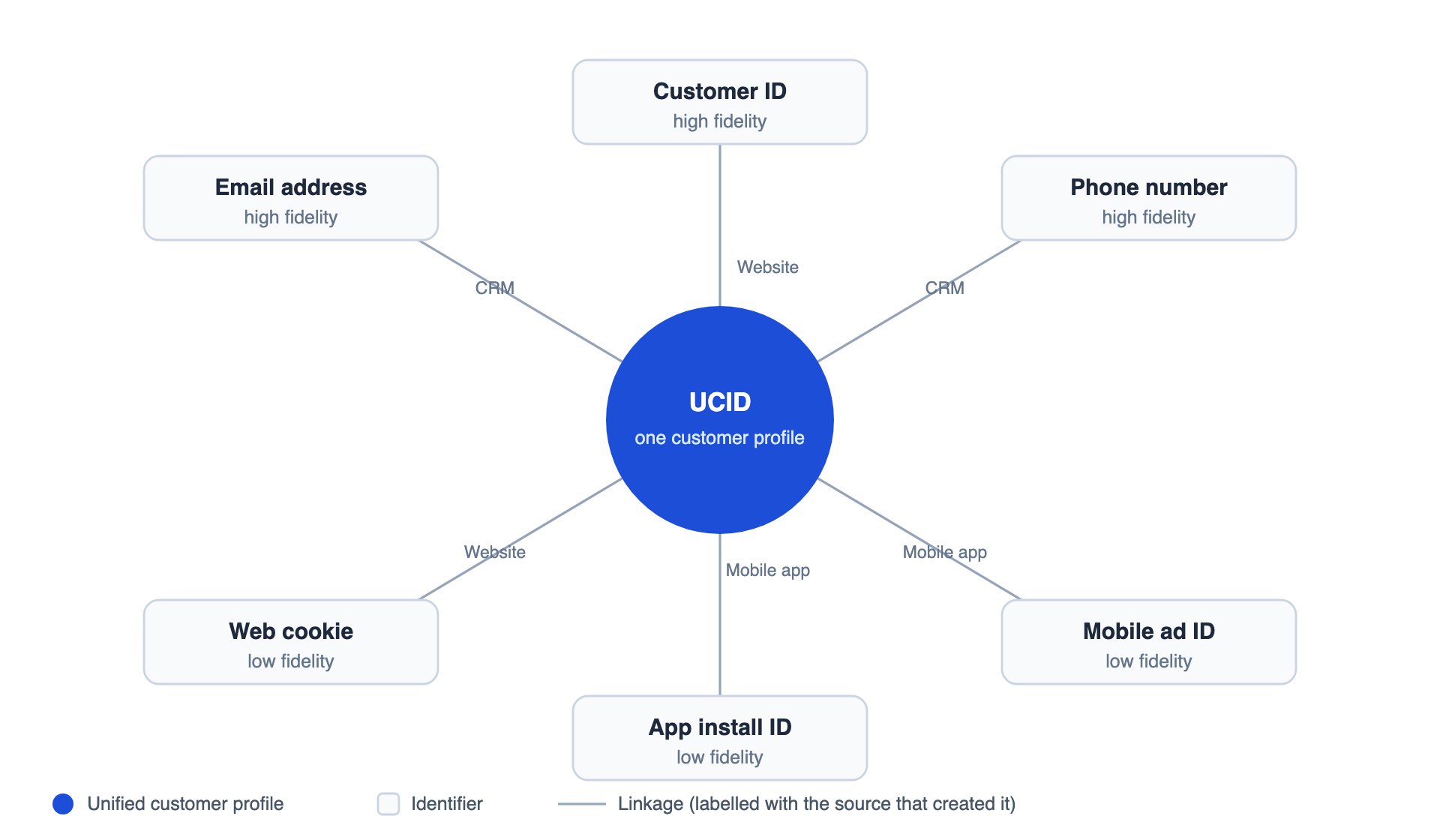 Your identity graph is specific to your account — identifiers and profiles are never resolved across organisations.
## The UCID (Zeotap's persistent identifier)
The **Unique Customer ID (UCID)** is the persistent Zeotap profile ID created per uniquely identified user. It is tied to all the other identifiers collected for that user across every source you have onboarded, which is what gives you a single 360-degree view of the customer.
| Event | What happens to the UCID |
| :-------------------------------------------------- | :---------------------------------------------------------------------------------------------------------------------------------------------------- |
| A record arrives that matches no existing profile | A new UCID is created for that customer. |
| A record arrives that matches one existing profile | The UCID is unchanged — the existing profile is enriched with the new identifiers, attributes, events, and consent. |
| A record arrives that matches more than one profile | Reconciliation merges them: the profile with the **first created** UCID is retained as the master, and the other matched profiles are merged into it. |
A UCID is persistent, but it is not immutable. When two profiles turn out to belong to the same person, one of them is merged away — its identifiers, attributes, and events move to the surviving master profile.
`ucid` is also a reserved field in your catalogue, so a catalogue field with that name cannot be created for any other purpose — see [Reserved Catalogue Fields](/articles/unify-customer/reserved-catalogue-fields).
## Deterministic matching
Zeotap resolves identities **deterministically**. A record joins a profile only when it carries an identifier value that is already known for that profile — matching is never inferred from behaviour, device characteristics, or statistical similarity.
That has three practical consequences:
* **Predictable** — you can trace exactly why any two records resolved together: they shared an identifier value.
* **Configurable** — you decide which identifiers are allowed to make matches, and how they rank against each other.
* **Dependent on your data** — records that arrive without a trusted identifier cannot be joined to a known customer, so mapping at least one high-fidelity identifier on every source matters.
For exactly what happens to an incoming record under a Custom strategy, see [How does Custom Strategy Work](/articles/unify-customer/how-does-the-strategy-work).
## Key terms
| Term | Meaning |
| :---------------------- | :--------------------------------------------------------------------------------------------------------------------------------------------------------------------------------------------------------------------------------------------- |
| **Identity resolution** | Deciding which incoming records belong to the same customer, and joining them into one profile. |
| **Unification** | The merging of matched profiles or records into a single profile. Resolution decides *where a record belongs*; unification is the *merge* that follows. |
| **Identity graph** | The identifiers held for your account and the linkages between them. |
| **UCID** | Unique Customer ID — the persistent profile identifier created per uniquely identified user. |
| **Identifier fidelity** | How reliably an identifier maps to one person. High-fidelity identifiers are unique, persistent, and present across sources (customer ID, email); low-fidelity identifiers can be shared between people or change often (cookies, device IDs). |
| **Classification** | The first level of merge control: marking each identifier Primary (high fidelity), Secondary (low fidelity), or Disabled. See [High-fidelity or Custom ID Strategy](/articles/unify-customer/high-fidelity-or-custom-id-strategy). |
| **Prioritisation** | The second level of merge control: ranking identifiers within a classification. See [ID Prioritisation](/articles/unify-customer/id-prioritisation). |
| **Linkage** | The association created between two identifiers that arrived in the same record. Whether a linkage lets a later record carrying only one of them resolve to that profile depends on how the identifier is classified in your ID strategy. |
| **Reconciliation** | What happens when a record matches more than one profile: one profile becomes the master and the others are merged into it. |
| **Master profile** | The profile retained after reconciliation. |
| **Stitching** | An informal synonym for identity resolution — for example, stitching an anonymous visit to a known customer. |
## In this section
## Related Topics
* To know more about the types of ID Strategies available, refer [here](/articles/unify-customer/id-strategies).
* To know more about how to configure the ID strategy for your account, refer [here](/articles/unify-customer/configure-the-id-strategy).
Your identity graph is specific to your account — identifiers and profiles are never resolved across organisations.
## The UCID (Zeotap's persistent identifier)
The **Unique Customer ID (UCID)** is the persistent Zeotap profile ID created per uniquely identified user. It is tied to all the other identifiers collected for that user across every source you have onboarded, which is what gives you a single 360-degree view of the customer.
| Event | What happens to the UCID |
| :-------------------------------------------------- | :---------------------------------------------------------------------------------------------------------------------------------------------------- |
| A record arrives that matches no existing profile | A new UCID is created for that customer. |
| A record arrives that matches one existing profile | The UCID is unchanged — the existing profile is enriched with the new identifiers, attributes, events, and consent. |
| A record arrives that matches more than one profile | Reconciliation merges them: the profile with the **first created** UCID is retained as the master, and the other matched profiles are merged into it. |
A UCID is persistent, but it is not immutable. When two profiles turn out to belong to the same person, one of them is merged away — its identifiers, attributes, and events move to the surviving master profile.
`ucid` is also a reserved field in your catalogue, so a catalogue field with that name cannot be created for any other purpose — see [Reserved Catalogue Fields](/articles/unify-customer/reserved-catalogue-fields).
## Deterministic matching
Zeotap resolves identities **deterministically**. A record joins a profile only when it carries an identifier value that is already known for that profile — matching is never inferred from behaviour, device characteristics, or statistical similarity.
That has three practical consequences:
* **Predictable** — you can trace exactly why any two records resolved together: they shared an identifier value.
* **Configurable** — you decide which identifiers are allowed to make matches, and how they rank against each other.
* **Dependent on your data** — records that arrive without a trusted identifier cannot be joined to a known customer, so mapping at least one high-fidelity identifier on every source matters.
For exactly what happens to an incoming record under a Custom strategy, see [How does Custom Strategy Work](/articles/unify-customer/how-does-the-strategy-work).
## Key terms
| Term | Meaning |
| :---------------------- | :--------------------------------------------------------------------------------------------------------------------------------------------------------------------------------------------------------------------------------------------- |
| **Identity resolution** | Deciding which incoming records belong to the same customer, and joining them into one profile. |
| **Unification** | The merging of matched profiles or records into a single profile. Resolution decides *where a record belongs*; unification is the *merge* that follows. |
| **Identity graph** | The identifiers held for your account and the linkages between them. |
| **UCID** | Unique Customer ID — the persistent profile identifier created per uniquely identified user. |
| **Identifier fidelity** | How reliably an identifier maps to one person. High-fidelity identifiers are unique, persistent, and present across sources (customer ID, email); low-fidelity identifiers can be shared between people or change often (cookies, device IDs). |
| **Classification** | The first level of merge control: marking each identifier Primary (high fidelity), Secondary (low fidelity), or Disabled. See [High-fidelity or Custom ID Strategy](/articles/unify-customer/high-fidelity-or-custom-id-strategy). |
| **Prioritisation** | The second level of merge control: ranking identifiers within a classification. See [ID Prioritisation](/articles/unify-customer/id-prioritisation). |
| **Linkage** | The association created between two identifiers that arrived in the same record. Whether a linkage lets a later record carrying only one of them resolve to that profile depends on how the identifier is classified in your ID strategy. |
| **Reconciliation** | What happens when a record matches more than one profile: one profile becomes the master and the others are merged into it. |
| **Master profile** | The profile retained after reconciliation. |
| **Stitching** | An informal synonym for identity resolution — for example, stitching an anonymous visit to a known customer. |
## In this section
## Related Topics
* To know more about the types of ID Strategies available, refer [here](/articles/unify-customer/id-strategies).
* To know more about how to configure the ID strategy for your account, refer [here](/articles/unify-customer/configure-the-id-strategy).