> ## Documentation Index
> Fetch the complete documentation index at: https://docs.zeotap.com/llms.txt
> Use this file to discover all available pages before exploring further.
# How to Stitch Unknown to Known Profile using the Custom Strategy
> How to configure the Custom (high-fidelity) ID strategy so that anonymous, low-fidelity interactions unify with a known customer profile.
This page covers the stitching mechanic only. For what the Custom strategy is and when to choose it, see [High-fidelity or Custom ID Strategy](/articles/unify-customer/high-fidelity-or-custom-id-strategy); for how classification and priorities work in general, see [ID Prioritisation](/articles/unify-customer/id-prioritisation).
## How stitching works
As per the nature of unknown or anonymous interaction, the identifier that is received or tracked is always of low fidelity. If these low-fidelity identifiers are marked as Secondary, then they do not unify with a known or high-fidelity identifiers' profile. If you want to unify these anonymous profiles with a known identity, then you have to even consider low fidelity IDs in the Primary classification.
This setting itself starts unifying the profiles with high-fidelity-based customer profiles. However, we recommend that you keep these low-fidelity identifiers at the lowest priority when compared to the other high-fidelity identifiers in the Primary classification. Based on this setting, this ID participates in identity resolution and unification only in the absence of other higher-fidelity identifiers.
## Example configuration
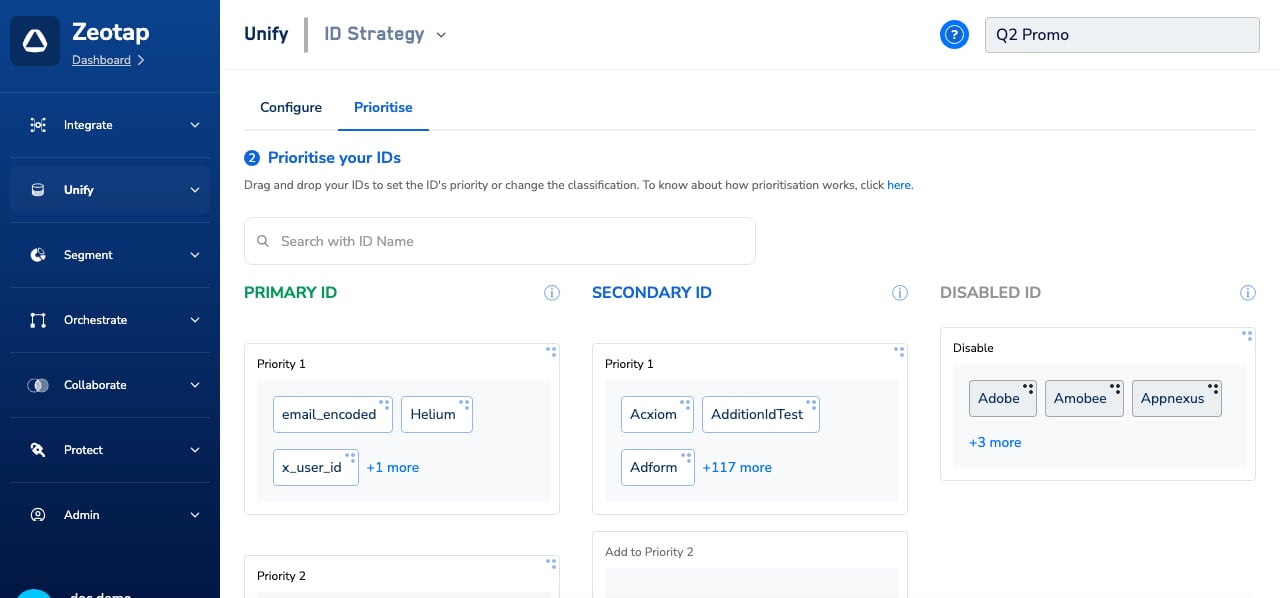
You classify and prioritise identifiers on the **Prioritise your IDs** screen of the ID Strategy configuration — drag an ID between the Primary, Secondary, and Disabled classifications and between priority levels within a classification.
 | **IDENTIFIER** | **CLASSIFICATION** | **PRIORITY** | **NO. OF ID TO STORE PER PROFILE** |
| :------------- | :----------------- | :----------- | :--------------------------------- |
| `User ID` | Primary | 1 | 1 |
| `Email` | Primary | 2 | 1 |
| `Cellphone` | Primary | 2 | 1 |
| `GA Client ID` | Primary | 3 | 5 |
| `Maid` | Secondary | 1 | 5 |
| `CCode` | Disabled | | |
Here, the low-fidelity `GA Client ID` is included in the Primary classification at the lowest priority (3), so it can stitch anonymous website visits to the known profile — but only when no higher-fidelity Primary ID is present in the record.
## How records resolve
| **USE CASE** | **DATA RECORD** | **WHAT DOES ZEOTAP DO?** | **PROFILE CREATED** | **NOTES** |
| :----------------------------------------------------------------------- | :------------------------------------------------------------------------ | :--------------------------------------------------------------------------------------------------------------------------------------------------------------------------------------------------------------------------------------------------------------------------------------------------------------------------------------------------------------------------- | :------------------------------------------------------------------------------------------------------------ | :---------------------------------------------------------------------------------------------------------------------------------------------------- |
| A profile of User A is shared from their Brand's CRM | `Mobile: C1`
| **IDENTIFIER** | **CLASSIFICATION** | **PRIORITY** | **NO. OF ID TO STORE PER PROFILE** |
| :------------- | :----------------- | :----------- | :--------------------------------- |
| `User ID` | Primary | 1 | 1 |
| `Email` | Primary | 2 | 1 |
| `Cellphone` | Primary | 2 | 1 |
| `GA Client ID` | Primary | 3 | 5 |
| `Maid` | Secondary | 1 | 5 |
| `CCode` | Disabled | | |
Here, the low-fidelity `GA Client ID` is included in the Primary classification at the lowest priority (3), so it can stitch anonymous website visits to the known profile — but only when no higher-fidelity Primary ID is present in the record.
## How records resolve
| **USE CASE** | **DATA RECORD** | **WHAT DOES ZEOTAP DO?** | **PROFILE CREATED** | **NOTES** |
| :----------------------------------------------------------------------- | :------------------------------------------------------------------------ | :--------------------------------------------------------------------------------------------------------------------------------------------------------------------------------------------------------------------------------------------------------------------------------------------------------------------------------------------------------------------------- | :------------------------------------------------------------------------------------------------------------ | :---------------------------------------------------------------------------------------------------------------------------------------------------- |
| A profile of User A is shared from their Brand's CRM | `Mobile: C1`
`Email: E1` | - In this record, there are two Primary IDs and both are of the same priority.
- Hence, both IDs are used for ID resolution (lookup).
- For C1, the match found is profile Z3 and for E1 the match found is profile Z1.
- The profile with the first created UCID, that is, Z1 is retained as the master profile and Z3 is merged into it.
| `Z1 { User ID: U1, Email: E1, Mobile: C1, Maid: M2, M1, GA Client ID: G1 }` | This use case showcases how the system performs ID resolution and unification if a record contains the same priority ID within the classification. |
| User A navigates to the brand's website and logs in | `User ID: U1`
`GA Client ID: G1`
`Adobe cookie: A1` | - In this record, there are two Primary IDs: U1 is defined as Priority 1 and G1 is assigned Priority 3.
- The ID resolution happens using U1, and G1 is used for reconciliation of any record where G1 is the highest ID in that profile.
- For U1 and G1 the match found is Z1. Hence, the Z1 profile is updated.
| `Z1 { User ID: U1, Email: E1, Mobile: C1, Maid: M2, M1, GA Client ID: G1, Adobe Cookie: A1 }` | |
| User A navigates to the brand's website anonymously (without logging in) | `GA Client ID: G1`
`TTD Cookie: T1` | - Here, we have received data against a Primary identifier, GA Client ID.
- Considering that this is the only Primary identifier in the record, the system finds Z1 (a Primary-ID-based profile) as a match for this ID and updates the data for this profile.
| `Z1 { User ID: U1, Email: E1, Mobile: C1, Maid: M2, M1, GA Client ID: G1, Adobe Cookie: A1, TTD Cookie: T1 }` | This use case showcases the unification of an anonymous interaction of a user to a known profile based on a lower priority Primary ID — GA Client ID. |
Changes to an ID strategy apply to newly ingested records only — see [Edit an ID Strategy](/articles/unify-customer/edit-an-id-strategy) for the considerations before modifying a live strategy.
## Related Topics