> ## Documentation Index
> Fetch the complete documentation index at: https://docs.zeotap.com/llms.txt
> Use this file to discover all available pages before exploring further.
# How does Custom Strategy Work
> The matching algorithm behind the Custom strategy: what happens to an incoming record depending on whether its identifiers are Primary, Secondary, or Disabled.
## Overview
Under the Custom strategy you classify each identifier as Primary, Secondary, or Disabled — see [High-fidelity or Custom ID Strategy](/articles/unify-customer/high-fidelity-or-custom-id-strategy) for what those classifications mean. This page explains what the system does with an incoming record once those classifications are in place.
## Match scenarios
When a new data record is received, the system looks up the existing profiles based on how you have classified your identifiers, and performs the action below.
| **SCENARIO** | **MATCH RESULT** | **ACTION** |
| :-------------------------------------------------------------------- | :---------------------------------------------------- | :------------------------------------------------------------------------------------------------------------------------------------------------------------------------------------------------------------------------------------------------------------------------------- |
| If a Primary ID exists | Match not found | Create a new user profile (UCID). |
| If a Primary ID exists | One match found | For the same UCID, enrich the existing profile with the user traits, consent, identifiers, and events received in the record. |
| If a Primary ID exists | More than one match found | Reconciliation logic:- The UCID that was created first is picked as the master UCID.
- All the other UCIDs are reconciled to the master UCID.
- All the corresponding user traits, consent, identifiers, and events are merged into the master UCID.
|
| If only a Secondary ID exists | Match not found | Create a new user profile (UCID). |
| If only a Secondary ID exists | One match found | Enrich the existing profile with the user traits, consent, identifiers, events, and more. |
| If only a Secondary ID exists | More than one match found | Reconciliation logic:- The UCID that was created first is picked as the master UCID.
- All the other UCIDs are reconciled to the master UCID.
- All the corresponding user traits, consent, identifiers, and events are merged into the master UCID.
|
| If all the incoming IDs are disabled, or no ID is found in the record | Not applicable — no identifier is eligible for lookup | Reject the record and log it as an erroneous record. |
**Note:**
The above table explains a scenario where the ID prioritisation feature is not used — that is, all the IDs within a classification (Primary or Secondary) are treated the same. For how priorities change these outcomes, see [ID Prioritisation](/articles/unify-customer/id-prioritisation).
### Example
We are considering the following ID classification to further explain the use cases for ID Classification:
| **IDENTIFIER** | **CLASSIFICATION** |
| :------------- | :----------------- |
| `User ID` | Primary |
| `Email` | Primary |
| `MAID` | Secondary |
| `GA client ID` | Secondary |
| `TTD Cookie` | Disabled |
**Note:**
In this use case, the priority of these IDs is the same within their classification.
| **USE CASE** | **DATA SCENARIO** | **WHAT DOES ZEOTAP DO?** | **PROFILE CREATED** |
| :----------------------------------------------------------------- | :--------------------------------------------------------------------------------------------- | :-------------------------------------------------------------------------------------------------------------------------------------------------------------------------------------------------------------------------------------------------------------------------------------------------------------------------------------------------------------------------------------------------- | :------------------------------------------------------------------------------ |
| User A logs into the Brand's mobile app 1 | `User ID: U1`
`Maid: M1` | - Among the identifiers received, U1 is a Primary identifier.
- The system looks up a match for U1.
- With no match found, it creates a new UCID: Z1.
- It also creates linkages with all the other identifiers and maps the other information like profile, event, and consent received in the record.
| `Z1 { User ID: U1, Maid: M1 }` |
| User A logs into the Brand's app 1 using a different mobile device | `User ID: U1`
`Maid: M2` | - As U1 is a Primary identifier, the system looks up a match for U1.
- It finds a match for U1.
- It updates the profile Z1 with the new ID linkages and the other information received.
| `Z1 { User ID: U1, Maid: M1, M2 }` |
| User A logs into the Brand's app 2 using the same mobile device | `Email: E1`
`Maid: M2` | - As E1 is a Primary identifier, the system looks up a match for E1.
- With no match found, it creates a new UCID: Z2.
- It also creates linkages with all the other identifiers and maps the other information like profile, event, and consent received in the record.
| `Z2 { Email: E1, Maid: M2 }` |
| User A logs into the Brand's website | `User ID: U1`
`Email: E1`
`GA Client ID: G1`
`TTD cookie: T1` | - As both U1 and E1 are Primary IDs, the system looks up a match with both the IDs and finds Z1 and Z2.
- In this case, the profile with the first created UCID, that is, Z1 is retained as the master profile and the other matched profile, Z2, is merged into it.
- The disabled identifier, TTD cookie T1, is stored on the profile but takes no part in the match.
| `Z1 { User ID: U1, Email: E1, Maid: M1, M2, GA Client ID: G1, TTD cookie: T1 }` |
| — | `TTD cookie: T1` | If a record contains no Primary or Secondary identifiers and just has disabled identifiers, or no identifier at all, then Zeotap rejects such a record and logs it as an erroneous record. | No profile is created or updated |
## Disable ID
Disabled identifiers are still ingested and stored against the profile, and stay available to you downstream — being Disabled only keeps them out of identity resolution, where they cannot create a profile, match one, or merge two. Disable an identifier when you do not want it to influence which profile a record belongs to.
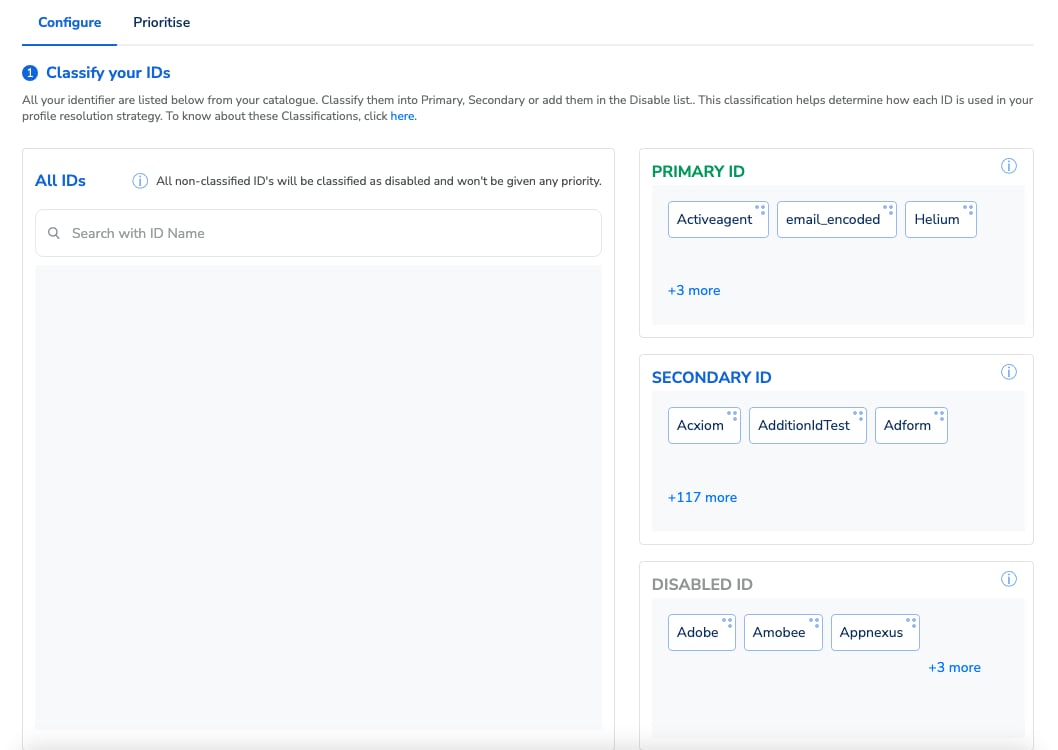 When you choose a Custom strategy, every identifier starts as **Disabled** by default — including identifiers added to your catalogue later. Classify an identifier as Primary or Secondary if you want it to take part in identity resolution.
## Related Topics
When you choose a Custom strategy, every identifier starts as **Disabled** by default — including identifiers added to your catalogue later. Classify an identifier as Primary or Secondary if you want it to take part in identity resolution.
## Related Topics