> ## Documentation Index
> Fetch the complete documentation index at: https://docs.zeotap.com/llms.txt
> Use this file to discover all available pages before exploring further.
# Components of the Calculated Attributes Screen
The following list helps you to understand the various fields on the Calculated Attributes screen:
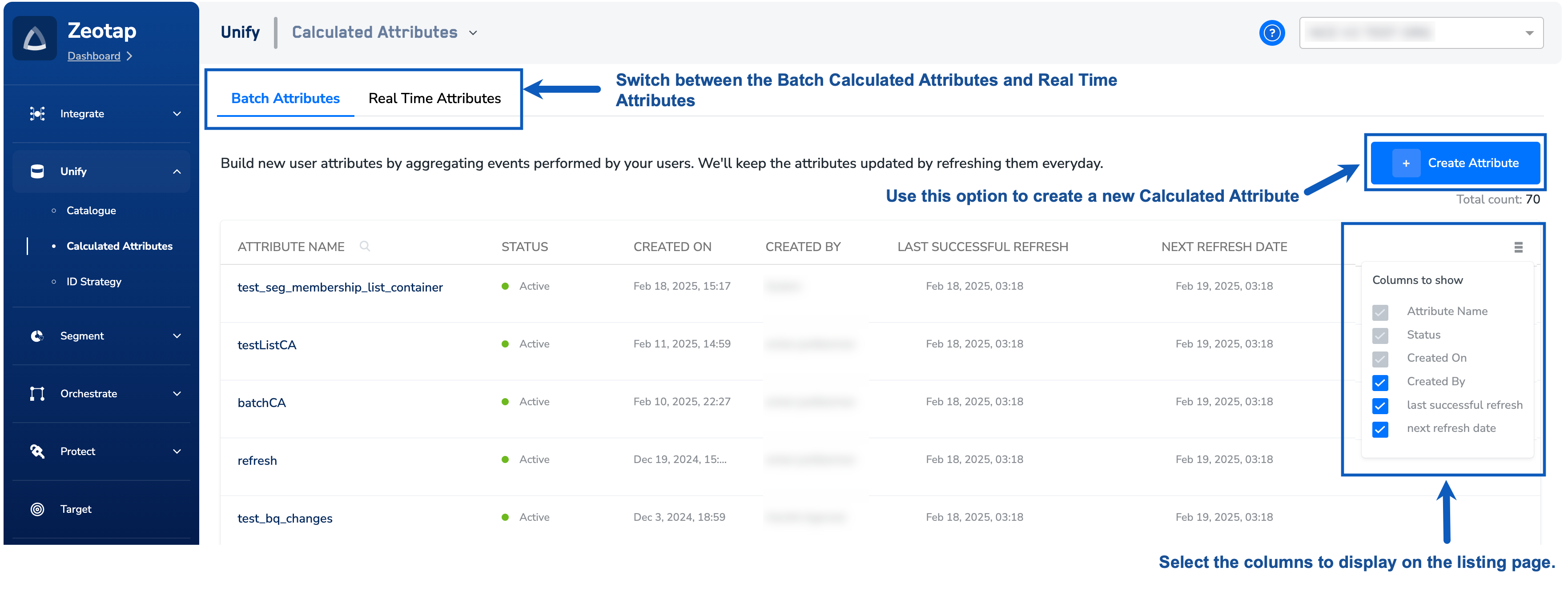 Navigate to the **CATALOGUE** tab to work with the calculated attributes. The above image shows the fields that appear under the **CATALOGUE** tab and the various actions that you can perform.
* **Attribute Name** – Name associated with the calculated attributes for easy identification
* **Status** – A calculated attribute can have the following statuses:
* **Active** – This indicates that the calculated attribute has been successfully refreshed and computed. The attribute moves to Active status after every successful refresh cycle. You can only use an active calculated attribute in workflows.
* **Published** – The calculated attribute has been created successfully and is currently computing its values. It will transition to **Active** once the initial computation is complete.
* **Draft** – The calculated attribute has been created but is still in draft state and has not been published.
* **Paused** – The calculated attribute computation is currently paused. Note that since all calculated attributes refresh together, a paused attribute will lose its existing values when the next refresh cycle is triggered. It will not be recomputed until it is resumed.
* **Failed** – The computation of the calculated attribute has failed. Since all calculated attributes refresh together, a failed attribute can cause the entire refresh cycle to fail, impacting all other calculated attributes. The issue must be resolved before the attribute can be computed successfully again.
* **Created On** – The date when the calculated attribute was created.
* **Created By** – Indicates who created the calculated attribute.
* **Last Successful Refresh** –
Indicates the date and time when the previous refresh was successfully triggered.
* **Next Refresh Date** –
Indicates the date and time when the next refresh is scheduled for the Calculated Attribute.
* **More Options** – Use this option to select the columns to display on the listing page.
* **Create Attribute** – Use this option to create a new Calculated Attribute. To know more about the process, refer to [Adding a Calculated Attribute](/articles/unify-customer/add-a-calculated-attribute).
**Note:**
For real-time calculated attributes, the **Last Successful Refresh** and **Next Refresh Date** options are unavailable because the refresh occurs in real time. Additionally, the **Pause/Resume** action is not supported for real-time calculated attributes.
Navigate to the **CATALOGUE** tab to work with the calculated attributes. The above image shows the fields that appear under the **CATALOGUE** tab and the various actions that you can perform.
* **Attribute Name** – Name associated with the calculated attributes for easy identification
* **Status** – A calculated attribute can have the following statuses:
* **Active** – This indicates that the calculated attribute has been successfully refreshed and computed. The attribute moves to Active status after every successful refresh cycle. You can only use an active calculated attribute in workflows.
* **Published** – The calculated attribute has been created successfully and is currently computing its values. It will transition to **Active** once the initial computation is complete.
* **Draft** – The calculated attribute has been created but is still in draft state and has not been published.
* **Paused** – The calculated attribute computation is currently paused. Note that since all calculated attributes refresh together, a paused attribute will lose its existing values when the next refresh cycle is triggered. It will not be recomputed until it is resumed.
* **Failed** – The computation of the calculated attribute has failed. Since all calculated attributes refresh together, a failed attribute can cause the entire refresh cycle to fail, impacting all other calculated attributes. The issue must be resolved before the attribute can be computed successfully again.
* **Created On** – The date when the calculated attribute was created.
* **Created By** – Indicates who created the calculated attribute.
* **Last Successful Refresh** –
Indicates the date and time when the previous refresh was successfully triggered.
* **Next Refresh Date** –
Indicates the date and time when the next refresh is scheduled for the Calculated Attribute.
* **More Options** – Use this option to select the columns to display on the listing page.
* **Create Attribute** – Use this option to create a new Calculated Attribute. To know more about the process, refer to [Adding a Calculated Attribute](/articles/unify-customer/add-a-calculated-attribute).
**Note:**
For real-time calculated attributes, the **Last Successful Refresh** and **Next Refresh Date** options are unavailable because the refresh occurs in real time. Additionally, the **Pause/Resume** action is not supported for real-time calculated attributes.